Miami, FL Mar 21, 2026
How to set the perfect Cancellation Policy
Cancellation Policies are an often-overlooked lever you can pull to make your listing more attractive to guests. More and more companies, from hotels to car rental companies, allow their customers to cancel up to the last minute. Even Amazon allows you to cancel your purchase and return it for free.
It's safe to assume that Airbnb and other OTAs (Online Travel Agencies) push listings with relaxed cancellation policies over those with super strict ones. (You can read more details about how cancellation policies stack up here.)
So why not just pick the most flexible cancellation policy and be done with it?
Cancellation Policies and Booking Window
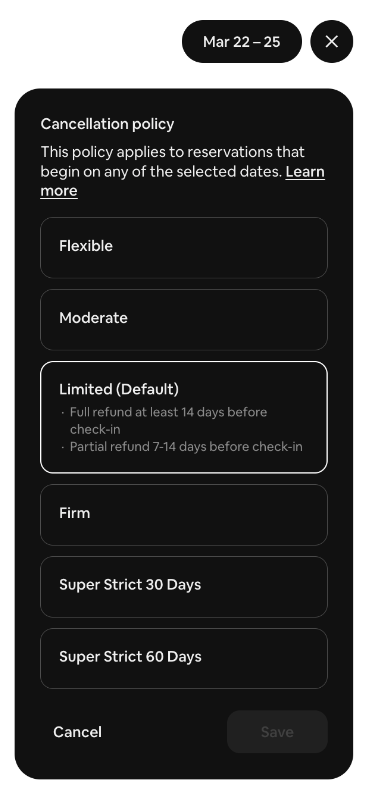
To choose your perfect cancellation policy, you must understand your booking window (or your booking lead time, as Airbnb calls it).
We host in Miami, and our booking window is around 14-21 days. I need to balance our occupancy with market demand. In our case, there's no reason to set a cancellation policy over 30 days (so that knocks out Firm, Super Strict 30, and 60 days), since I can achieve the same goal with the Limited policy, which will push our listings higher in search.
On the other hand, I do want to guard against our homes being cancelled at the last minute, so the Flexible and Moderate policies may be a little too relaxed to use. Those two are also the only ones that a guest can use Airbnb's new Reserve Now Pay Later (RNPL) policy. Read why we're not big fans of RNPL.
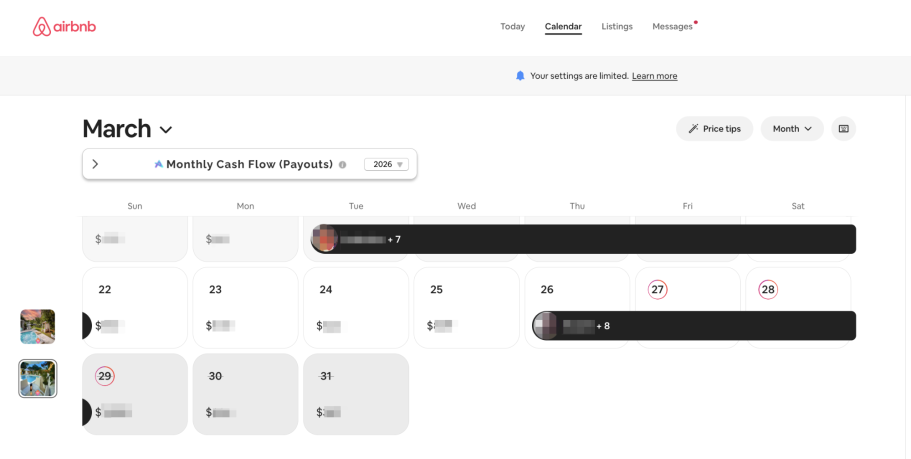
However, since Airbnb introduced Seasonal Cancellation Policies, it has opened up some interesting possibilities for using them to our advantage. Airbnb now lets you set policies for specific dates, which means if my listing is not booked next week, not only can I run a Custom Promotion (which, in my opinion, is the most powerful tool Airbnb gives us to run a discount and increase our nightly rate at the same time), but now we can leverage the bump that the most relaxed cancellation policies give us in search ranking as well. Let's take a look at a few days we have open for next week - we've already applied a custom promotion and now are going to change our cancellation policy from Limited to Flexible.
Why would we do that? Well, the 22nd is tomorrow, and the 25th is 4 days out. So the moderate policy would cover up to 7 days, whereas the flexible policy would allow guests to cancel pretty much any time.
But we're not booked, so we can see if that bump gets us a last-minute booking without lowering our rate.
Your pricing should be the last thing you change, to secure a booking.
#MastrmindProTip
You should adjust your minimum length of stay, your cancellation rate, etc., before dropping your pricing. To pick the perfect setting for all of these levers, you must understand your market. If you run a ski chalet in the mountains that gets booked 6 months before guests arrive, our strategy won't work for you, since you may not get booked at all if a guest cancels at the last minute.
But that also means that most of your competition will be running a similar cancellation policy (I'm assuming it's one of the Super Strict ones), so that it won't make a difference in your search results.
How do you pick the perfect cancellation policy? Look at the market data; we use Pricelabs to aggregate our local market KPIs (Key Performance Indicators) to make the best decisions. And with the new Seasonal Cancellation Policies, Airbnb has given us another tool to adjust and fine-tune how we run our business.
Miami, FL Feb 2026
How to Hack the Strikethrough:
Yup, you read that right. We use discounts on Airbnb without sacrificing revenue, thanks to our favorite tool: Custom Promotions.
Airbnb is probably the easiest and most powerful platform for providing tools to its hosts, which were only available to professional property managers a few years ago. But, like the saying goes, with great power comes great responsibility. Like any other tool, you must understand how it works before you can use it to its full potential (and maybe push the results a little further) or find yourself stacking discounts and end up getting booked at a much lower rate than you had wanted.
Who doesn't love a good discount?
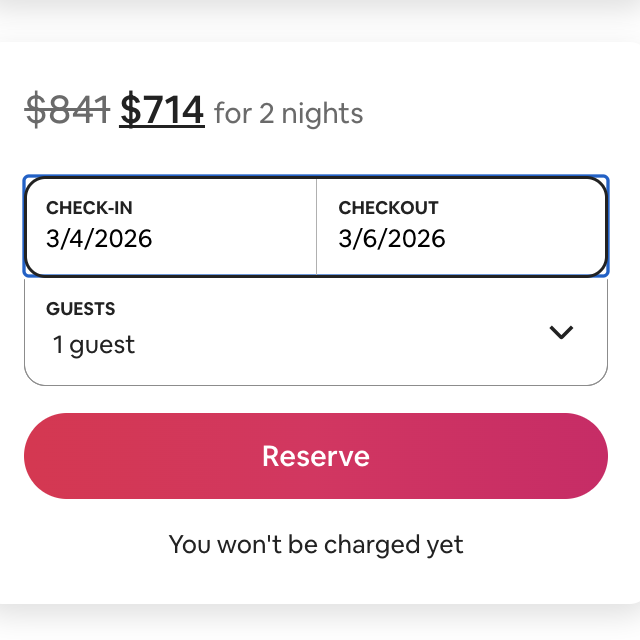
There are well-documented psychological and behavioral studies showing that consumers prefer a “discounted” item even when its final price is mathematically identical to a non-discounted item. Airbnb understands this and gives hosts the option to discount the nightly rate of their listing, adding different marketing benefits:
- 10% discount = Discounted strikethrough price
- 15% discount = Discount banner on listing
- 20% discount = Highlighted in emails
Guests look at the strike-through price and see two things:
1) There's a deal to be had (btw, you're seeing the rate plus fees for 2 nights), and
2) This listing is a better listing, since it usually costs $127 more.
I love using this tool, especially when we have a few days well within the booking window that need to be filled. Take next week, for example: we have a few days that aren't booked, so to fill those nights, our dynamic pricing software is lowering our nightly rate slightly to attract last-minute guests. It's looking ahead, checking the market demand, our own data, local factors, etc., and that's exactly why I love custom promotions:
They look backwards.
When Airbnb introduced custom promotions, it created a formula to prevent hosts from simply increasing the price by the discount amount to get the same nightly rate after the discount is applied. It's a little complicated to understand, but here's how it works:
- Pick the weekday you're discounting (the minimum is two). In our example, we're looking at Thursday and Friday.
- Go back through your calendar and record the past 9 prices for this weekday (that's the last 60 days).
- Sort these prices from lowest to highest (it's easiest to do that in a spreadsheet).
- Take the 4th number from the top (or the bottom, doesn't matter)
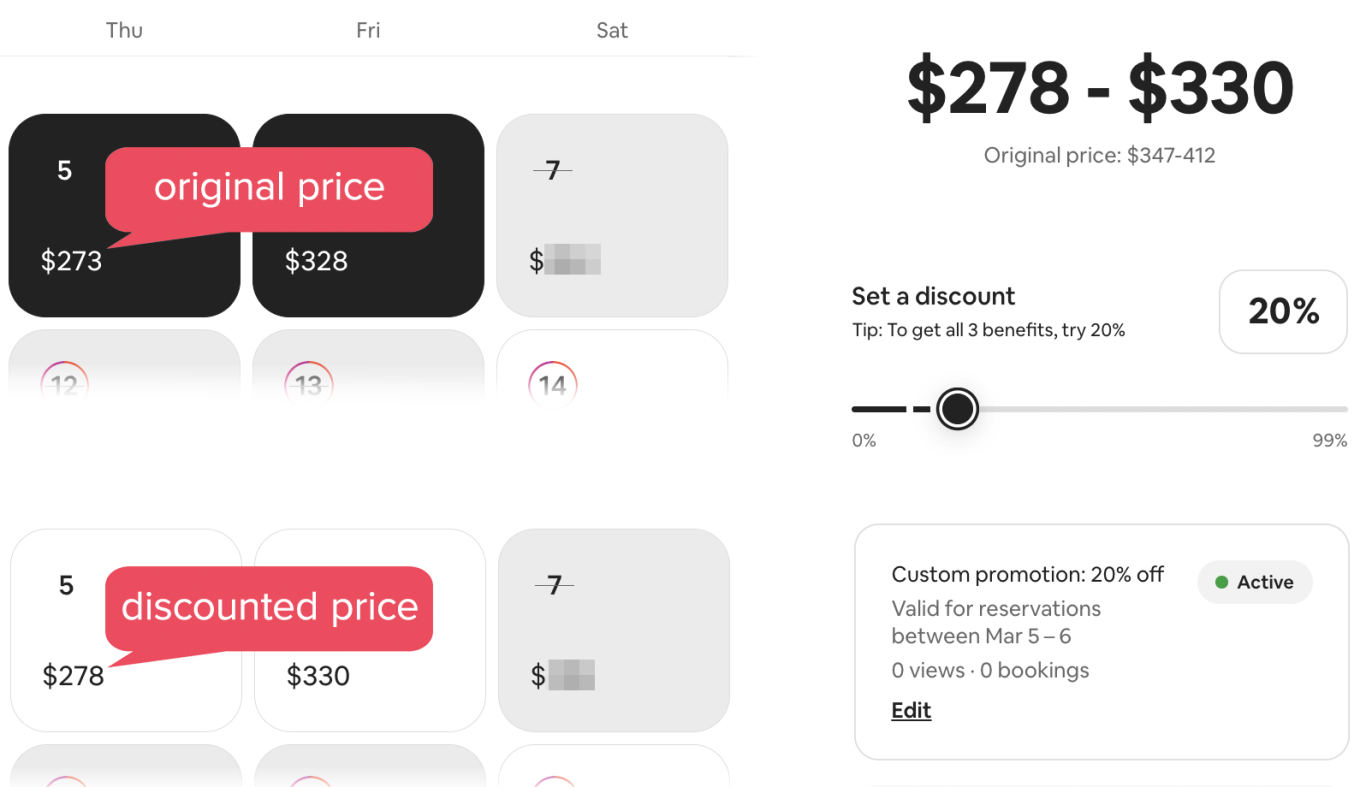
That's the base price that Airbnb will be use to calculate the discounted rate from, but since it's based on your historical bookings over the past two months, it will reflect relatively high prices, especially when looking back at your high season. And with that, our base rate minus the discount is almost always higher than the non-discounted rate. Here's what I mean:
#MastrmindProTip
So far so good, but here's where it gets interesting: Our original nightly rate for the 5th was $273, fed to the OTA by our PMS, which in turn gets the pricing from our dynamic pricing software. But that's not the price Airbnb is looking at for the custom promotion. It's looking at $347 for Thursday and $412 for Friday. Add the 20% discount in order to take advantage of all marketing benefits, and we end up with $278 for Thursday and $330 for Friday.
When adding the custom promotion for those dates today, we're advertising our listing at the same rate as before the discount, but we are getting all the marketing and psychological benefits of offering a 20% discount.
Which rate do you think will look more attractive to a guest?
- The full rate, no discount or strike through: $273
- A nice 20% discount that drops the rate to: $278
It's worth understanding how the tools work, so you can use them to your full advantage, don't you agree?
Inman, J. J., Peter, A. C., & Raghubir, P. (1997). Framing the deal: The role of restrictions in accentuating deal value. Journal of Consumer Research, 24(1), 68–79. https://doi.org/10.1086/209494
Darke, P. R., & Chung, C. M. Y. (2005). Effects of pricing and promotion on consumer perceptions: It depends on how you frame it. Journal of Retailing, 81(1), 35–47. https://doi.org/10.1016/j.jretai.2005.01.002