12 Off-Season Moves
That Supercharge Your Hosting Business
Miami, FLSep 12, 2026
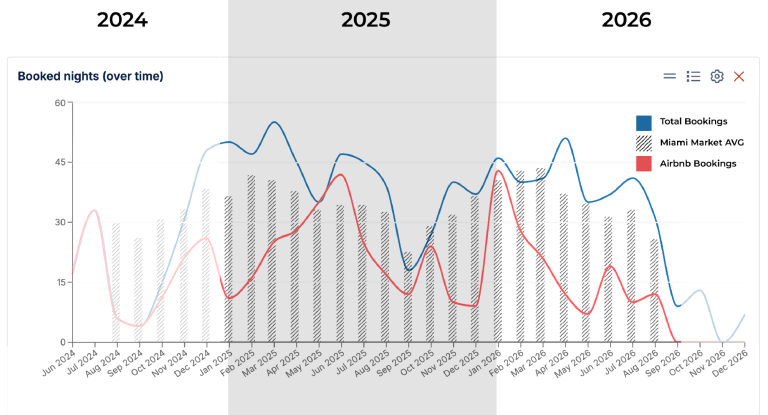
The sharp dip in mid-July through August was a surprise and, as I wrote a few weeks ago, September and October are always slow in Miami. Despite this dip, we can count ourselves fortunate: Miami’s market occupancy drops to the low 40%, whereas other, more seasonal markets, like Sardinia in Italy, go much, much lower. (More on that later; read #11 - I’ll share how our listings are doing.)
Here are 12 Off-Season moves you can start today
#1 Deep clean your listing:
Take a day and go through your listing with a fine-tooth comb, pull out the fridge (clean the coils while you’re at it; it’s good preventative maintenance), pull couches off the walls, and clean where the cleaners usually don’t get to. Pressure-wash outside and clean the windows; you know, get to the tasks that there’s normally no time for.

Take action in the slow season (and no, whining about how bad it is in the Fall is not one of them). All of them focus on supercharging your short-term vacation rental business, so you can hit the ground running in November, when high season starts up again:
#2 Schedule major renovations:
One of our listings had a roof that was over 80 years old. They sure don’t make them like they used to, so we had to replace it. The slow season of 2024 turned out to be the perfect time to schedule those big renovations, when the noise, dust, and debris don’t bother guests because bookings have slowed to a crawl. I’d much rather pause a listing when revenue is at a minimum than risk peak earnings during our high season.

#3 Inventory your amenities:
Spoons tend to disappear, and you can’t advertise a listing that sleeps 10 with four forks, eight spoons, and six knives. Count them (and while you’ve got it out of the drawer, clean that too - I bet your cleaners haven’t touched that in months; see #1). Same goes for cups, plates, pots & pans - you get the point.
It’s also a great time to double-check your listing to make sure all the amenities you have are listed (platforms sometimes add more options) and that none are offered that you don’t have; Airbnb added a hot tub to one of our places for a while a couple of years ago.
#4 Create new photography:

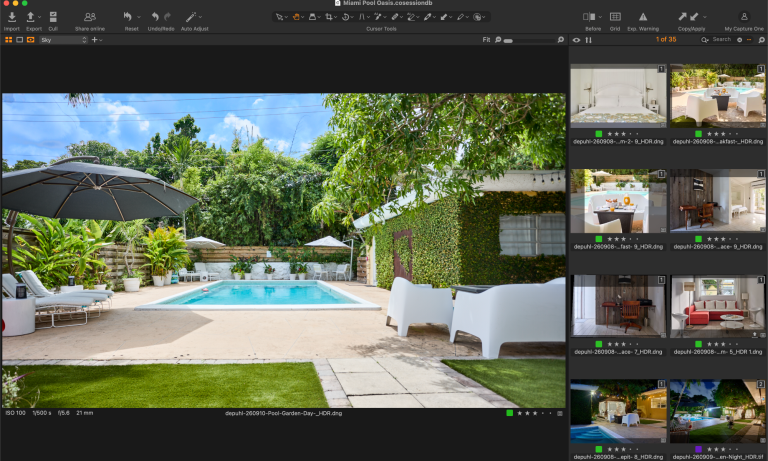
Listings have to get updated from time to time; furniture gets replaced, plants fill in, and, for example, we changed from flat sheets and coverlets to cooling duvets; all of that needs fresh photography. Since you deep-cleaned the home (right?) and the renovations are finished, you need new photography anyway.
Trust me, your photographer will love having a few days to wait for the perfect light and move a table or chair out of the way to get that perfect shot. We squeeze in photography during the year when we make changes, but nothing beats photographing everything at once for a coherent new look.
#5 Attend an STR conference:
Industry insiders call fall ‘conference season’, so why not take a few days and go to a vacation rental conference?
FAVR (the Florida Alliance of Vacation Rentals) is having its annual conference in a few weeks in Orlando, and Hostaway (our PMS) is holding its user conference in Tampa in November.
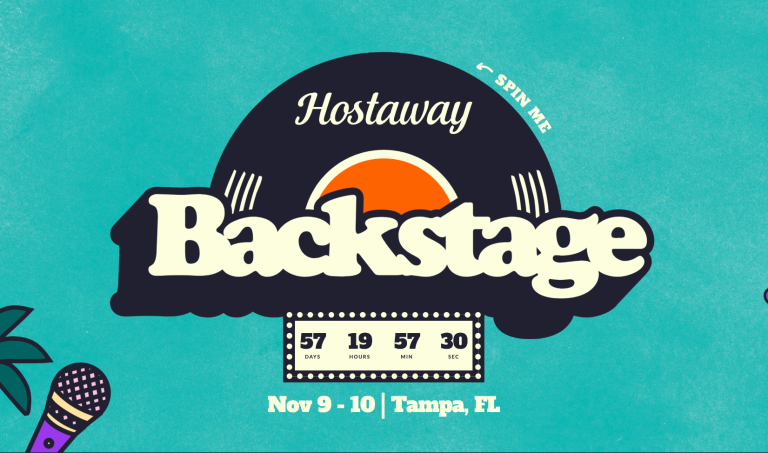
Jacomina and I are attending both; say hi if you’re coming too. Get inspired, learn something new, meet other hosts and vendors. We’ll see you there.
#7 Study lessons learned and adapt:

The famous philosopher George Santayana wrote: "Those who cannot remember the past are condemned to repeat it." That sentiment applies to short-term vacation rental businesses, too. Use these quiet days to take stock of what you’ve learned over the past year.
Special Forces call this the OODA loop: observe, orient, decide, act. The loop means doing it all over again. And again.
What worked really well? Where did you screw up? Which factors influenced your decisions and guests' behavior? When did guests book? When did guests rave about something in your listing? Why did others complain? Watch, Learn, Improve, Execute, Repeat.

#8 Review your tech stack:
All channels are constantly developing tools for hosts to use, from Airbnb's price tips and seasonal cancellation policies to VRBO's sponsored listings and new Premiere Host setup and Bookings Genius program and Premiere Plus Partner program; all take time for hosts to understand how to use these tools. (You should use those platform tools because, according to Tim Rosolio, VP of Vacation Rental Partnerships at Expedia Group, channels reward hosts who do in their search placement.)
However, some of us want more data and tighter control, so we build a software stack: external software products that work with the channels, like dynamic pricing software, property management systems (PMS), noise monitors, and other products that make hosting more seamless and integrated.
Learn a new channel tool or reevaluate your tech stack, ditch the outdated products, and try our new ones. Test automations you’ve created and fine-tune those that failed. It’s the perfect time to roll up your digital sleeves and get your hands dirty under the hood, so to speak, and fine-tune your business to purr along smoothly once the season's bookings roll in a few weeks.
#6 Go on vacation:

Hosting is a lot of work, physically and mentally. Between managing your listing and hosting guests, it takes a lot out of us. Don’t get me wrong, we love hospitality, but at the end of the day, it’s tiring.
Go on a vacation. Take a few days to rejuvenate, recharge, and refresh. Heck, take a week or more. And if you don’t think you can afford it, read action item #12 and learn how that step alone can pay for your stay - it’s the best-kept secret on this whole list :)
Bonus points if you book another short-term rental and observe how the host communicates before your check-in, how the listing is styled and prepped, and how they treat you as a guest. You can probably learn something.

#9 Explore alternative listing channels:
Miami market data shows Airbnb leads South Florida in homes listed on its platform, with a 60% market share. That’s a massive pool of potential guests, but it also means that 4 out of 10 potential guests booking a stay here are looking at other channels. (If you can afford to ignore 40% of potential bookings, more power to you; I know we don’t).
Everyone know VRBO, Booking.com and Airbnb as the main OTAs, but there are hundreds to work with. We are constantly looking for new advertising avenues to list our listings on and review their fit. We add new ones and remove non-performing ones. Make sure they integrate with your PMS.
Use this downtime to explore other places to advertise your listing to a new set of guests. In our experience, adding another channel doesn't cannibalize Airbnb bookings; it simply adds more reservations you are missing today.
#10 Conduct a guest feedback audit:
You should be mining your guest reviews; we’ve gotten some of our best ideas from guest suggestions. We read every review and tabulate what guests consistently mention (spoiler alert: over 94% mention our hospitality in their reviews). When bookings slow down, you can grab a cup of coffee and read over reviews and the past year's guest messages to see where you can improve and do better. It’s invaluable information. (Here’s where external software comes in handy; our PMS (HostAway) has an AI that aggregates review and guest message information. It’s a goldmine of information to improve our hosting game.

#11 Audit dynamic pricing rules:
Part of running a successful business is testing. How can your listing perform better? Will a new title make a difference, or does the description need updating? I recently heard a great podcast from our friends at PriceLabs, where they interviewed a property manager from Sardinia. This island off the coast of Italy’s season is nothing like the season we have here in Miami. During their slow season, occupancy on the island drops to less than 20%. But I perked up when Giovanni from eStay said:

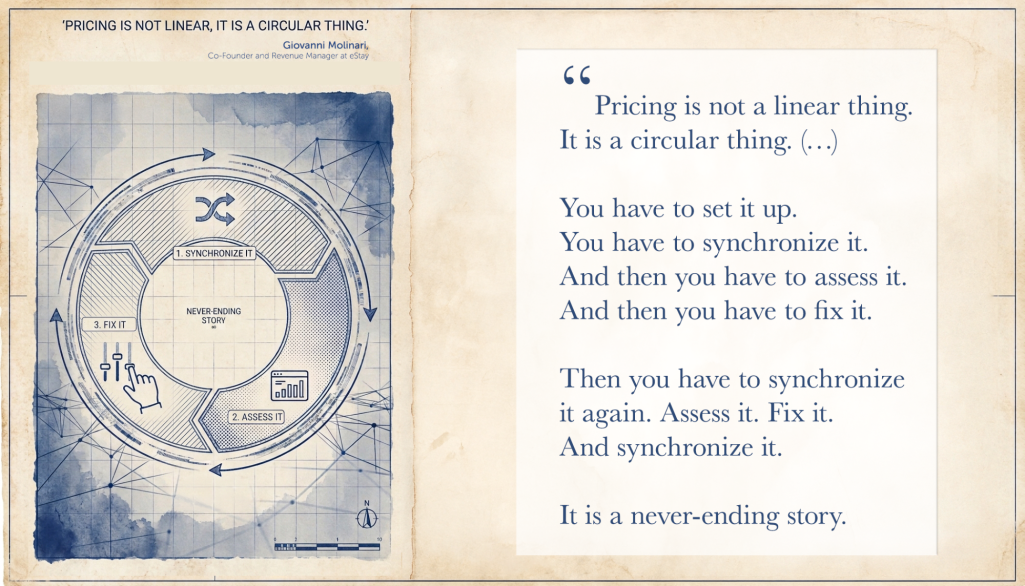
Hey! That’s the OODA Loop in different words. It’s true for pricing. Study your competitors' pricing strategy, look at general market data, and compare your current pricing and reservations with your own data from last year.
We do this all the time and have seen an almost 15% drop in revenue in the last 2 months. (See, I told you I was gonna tell you how we are doing). Fortunately, a few slow weeks don’t break the revenue for the whole year, and we’re up almost 24% year-to-date over the same period in 2025.
Low season is the perfect time to revisit your pricing strategy (and your minimum stay restrictions, length-of-stay settings, cancellation policies, etc.) BTW, those settings matter more than your pricing.
#12 Have guests stay for free:

Let people stay in your home for free. Yes, you read that correctly.
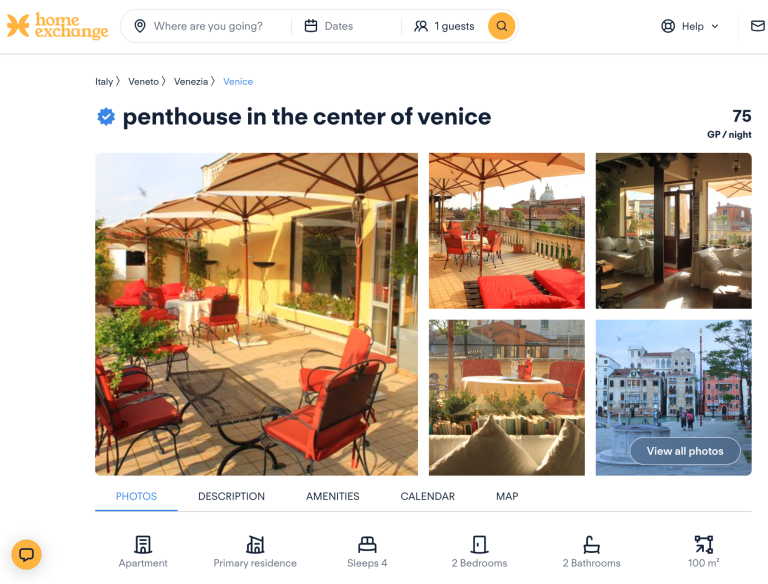
There is a channel called HomeExchange, where guests pay with points to stay at your home. Hey, noone’s paying for a stay in September and October anyway, right? So why not use the points you earn to book the place you stay at when you’re attending the next conference (we’re doing that in Orlando) or, even better yet, save up enough points to book a place to stay for your next vacation? That’s where we started this whole journey.
All of a sudden, that apartment on the Piazza San Marco in Venice, or the house built into the jungle in Costa Rica, sounds like an amazing location to reflect on how your short-term rental business did when you sit down in the slow season of 2027.
When you do, send us a postcard.
The $64,000 Question: Split Fee or Simple Fee?
The Answer Might Surprise You
Miami, FL Apr 08, 2026
!
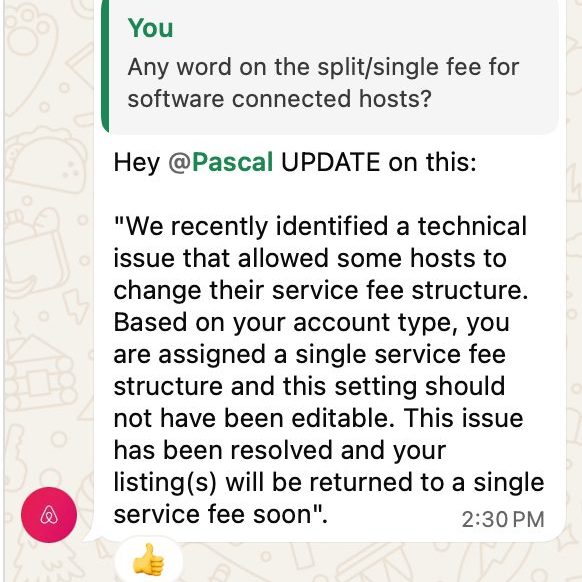
UPDATE: ON APRIL 27th AIRBNB fixed their technical issue, which means the split fee is no longer an option for sofetware connected host.
On April 20, 2026, we got confirmation from Airbnb that giving software-connected hosts the option to revert to the Split Fee was a technical Issue. Airbnb will change the fee structure back to the single fee at some point in the future (www.mastrmind.org/blog/split-fee-vs-single-fee/).
However, since hosts who are not software-connected so far still have a choice, this article explains how to make the choice and the mechanics of setting up your pricing if you choose the Split fee model.
In the Fall of 2025, Airbnb announced that all software-connected hosts, those of us who run Property Management Systems (PMSs), would have to pay Airbnb a 15.5% commission, instead of the 3% commission that most hosts were used to.
People were up in arms, especially short-term rental influencers who are selling snake oil. They were screaming from the rooftops that Airbnb raised its commission, and it was going to be the end of the world.
They were wrong.
So -for just a minute- please forget everything you’ve heard about this and look at it from the guests’ side, after all, we’re in the hospitality business, and if you don’t run a guest-focused business, you’re gonna fail.
Today, well, since the fall of 2025, guests only see the total price of their booking. [Scroll to the end of the article if you want to read about how it used to be.] Ok, so guests see one price for their booking. And your guest has never even heard of split vs. simple fee, nor do they care what your cleaning fee is or if you charge a service fee. At the end of the day, they want to know what the stay costs. Period. The only additional line on the final costs is the hotel tax they pay.
Should I choose a split fee or a simple fee as a host?
OK, from a guest's perspective, it simply doesn’t matter. Yes, if they go into payment details right before the payment screen, they can see the guest fee, but I don’t know anyone who does that. So your guests are not the deciding factor.
TL;DR:

Some hosts mark up the total stay cost to match the price guests see under the split fee, or you can mark up the stay to match your payout. If you don’t mark up your nightly rate, you are effectively giving your guest a nice discount on their stay; if you do, they will essentially see no difference.
The $64,000 question
Should you choose the split fee or the simple fee? First of all, I’m not sure if the reintroduction of the option to choose isn’t a fluke on Airbnb’s part. Most of the rest of the world’s host pay the simple fee when they connect their listings to a PMS.
Let’s, for the sake of argument, assume the choice is here to stay.
What is the better option? Well, let’s also assume you are running a business and will mark up your rates to match your payout. (If you don’t - you’re running a charity, which is sweet, but also a great way to fail as a business. Oh, and remember to increase your cleaning fee, pet fee, service fee, etc. - Airbnb takes 15.5% of those as well.)
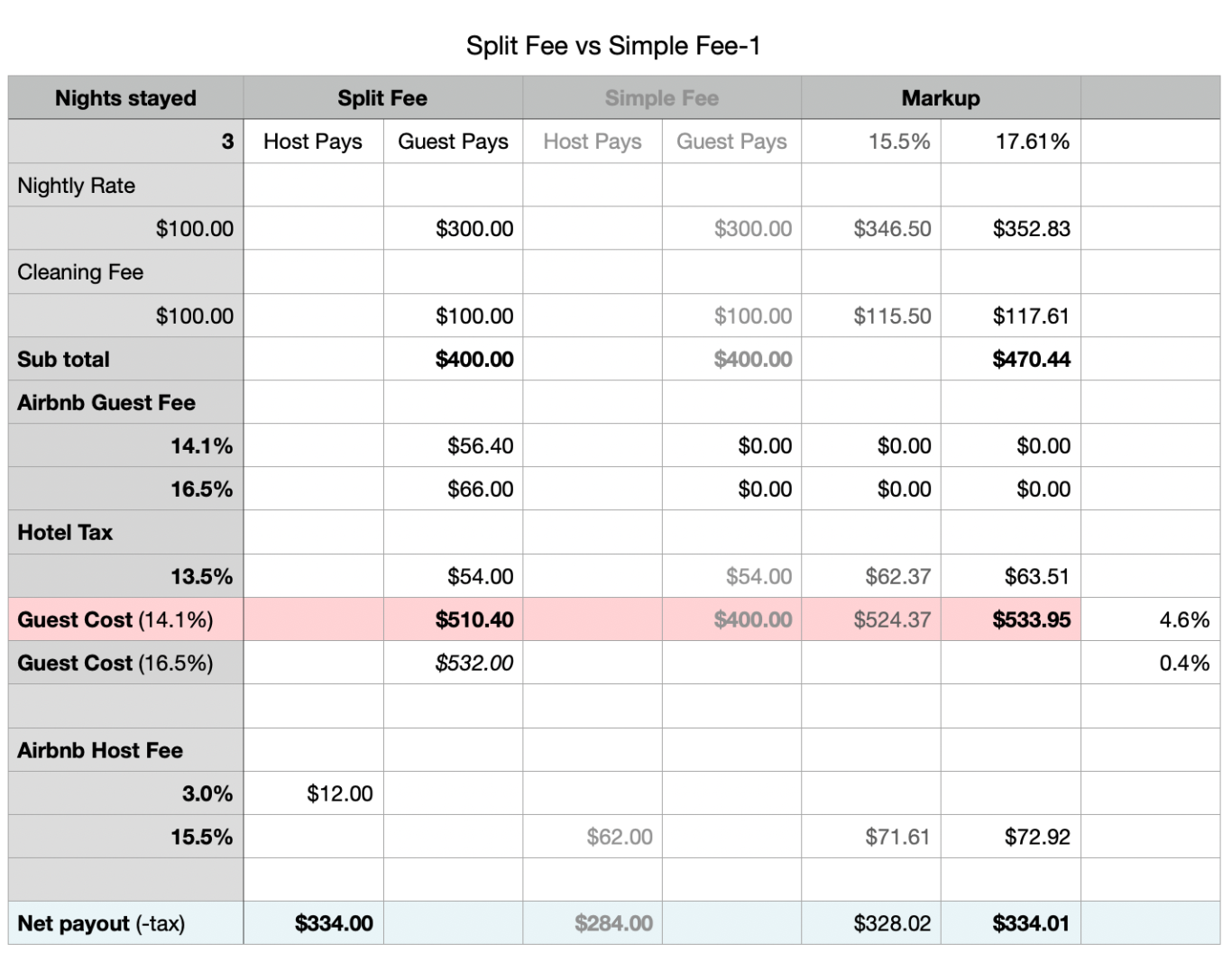
From a guest's perspective, the cost of their stay is either $510.40 - $532.00 under the split fee or $533.95 under the simple fee. The simple fee has the guest pay between $23.55 ($7.85 a night or 4.6%) and $1.95 (¢64 a night or 0.4%) more, while maintaining your payout of $334 after fees and taxes.
In the two years that we've been using the single fee, we have not seen it impact our rankings and bookings - especially not since Airbnb implemented its One Price Policy to comply with the FTC regulation on junk fees. In my opinion, it’s six one way, half a dozen the other. In other words, it makes no difference to you as a host and has a very slight (negative) difference to a guest.
Who benefits? Well, your taxing authority collects a higher amount of tax, while your payout is the same, and the guest pays a little bit more while you earn the same amount of money.
We’ve chosen to stay with the single fee; we’ve been using it since 2024 (a year before Airbnb made the switch mandatory), and since our revenue in Q1 2026 is up over 55% over last year, let’s just say that the single fee hasn’t hurt our business.
A history of short-term rental pricing
In October of 2025, Airbnb introduced its One Price Policy, which had been announced in the spring.
The One Price policy meant guests would now see only one price when booking, instead of the rate + cleaning fee + booking channel commission + tax. You see, in the old days, all the online channels advertised the nightly rate in search, and guests were getting fed up that when they got to the check-out screen, the price of their stay had almost doubled.
Airbnb calls the 15.5% option the simple fee (they used to call it the single fee), and the 3% host commission is what it calls a split fee. What those “Airbnb online experts” omit in their online rants is the other half of the split: the guest fee.
Here's the math if you want a deep dive;
How to Fix Your Hostaway Automations
after Truvi's April 2026 Update
Miami, FL Apr 08, 2026
* PS If you're curious why we send guests a TLDR (Too Long Didn't Read) check-in message, we explain that here.
Save it. You’ll now have two automations with the same name. Delete the old one, then move on to the next automation that uses Truvi as a condition. We have 45 automations, and it took me about an hour to go through them all, but it’s worth doing thoroughly before your next reservation comes in.
Last step: delete the test reservation you created. This will also remove the Truvi verification tied to it, which you won’t need since you already know you’re a trustworthy person.
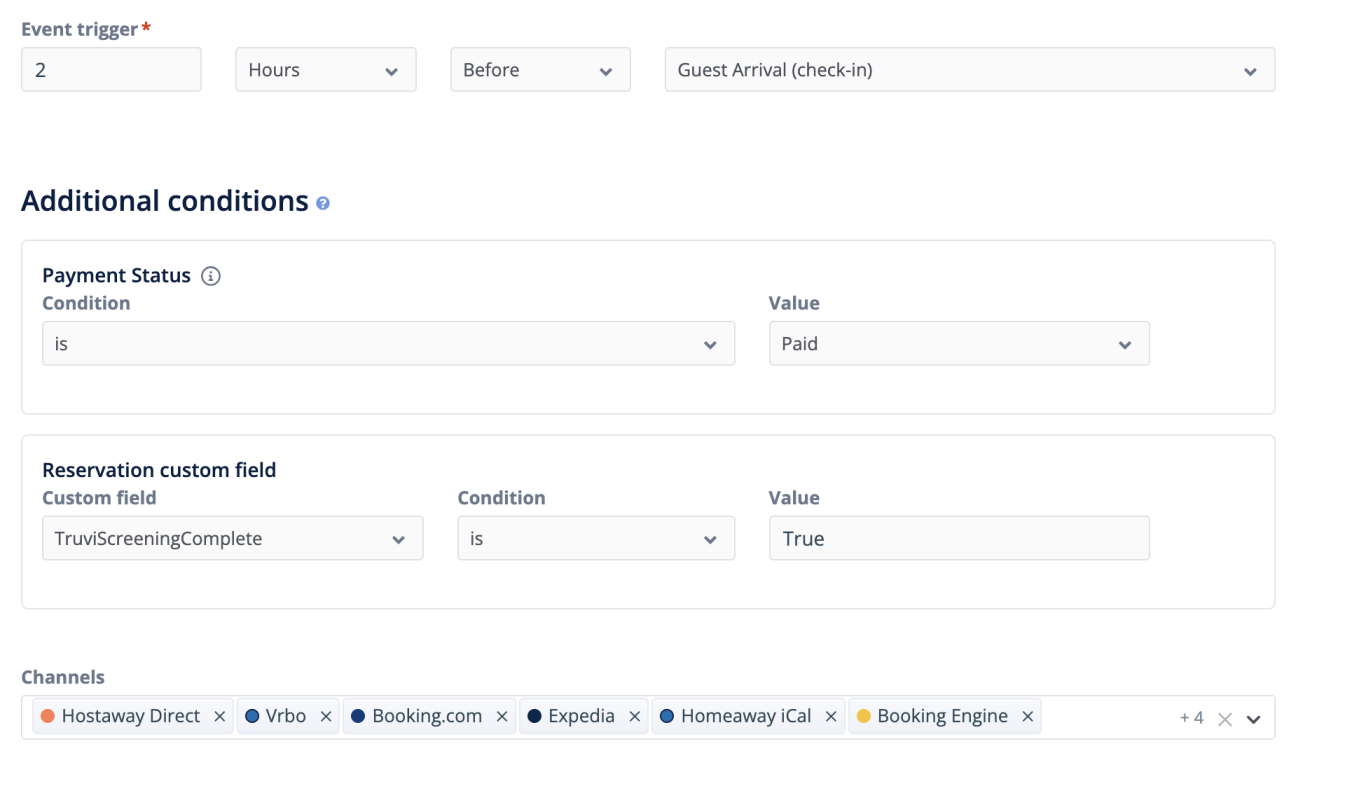
Change the Reservation custom field to “TruviScreendingComplete” and set the Value to “True”.
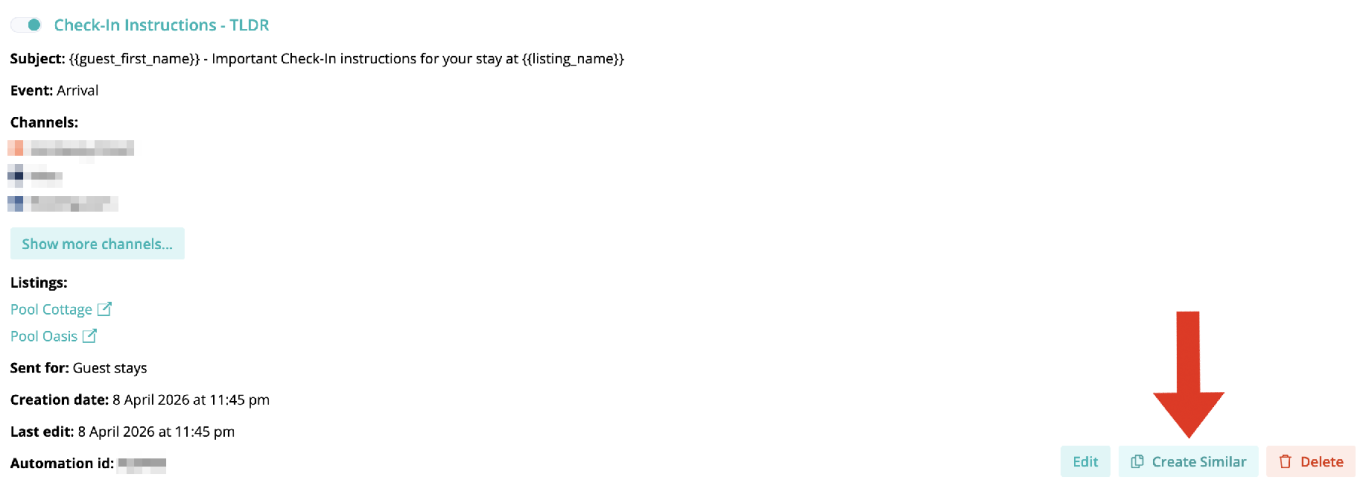
The fields are in place, but your automations still need to be updated. Here’s how to do that.
In Hostaway, go to Inbox → Automations.
Open any automation that uses Truvi as a condition and scroll down to the Event Trigger and Additional Conditions section. For example, we have a TLDR* check-in instructions message that goes out 2 hours before arrival, but only if the guest has paid and their Truvi screening is complete.
The old condition was called “superhogverificationstatus” with a value of “complete”. That field no longer exists.
You can’t use the edit function to change the conditions, so select “Create Similar”.

Enter your name, email, phone number, and check-in/check-out dates, then save. You don’t need to add payment details for a direct reservation, and you’ll be canceling this one anyway. Wait for Truvi to contact you on your phone and email for your guest verification - it takes anywhere from 15 minutes to an hour - it took 45 minutes for me today.
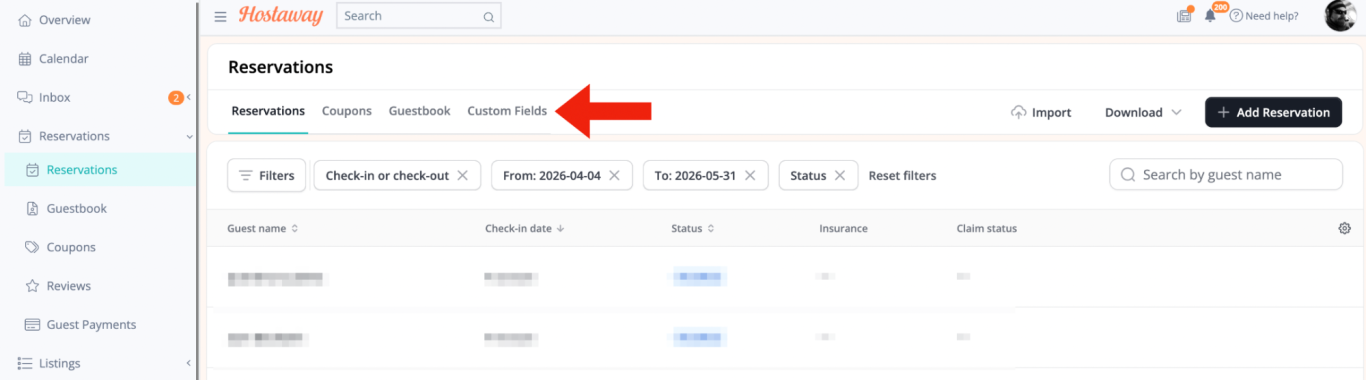
Once you get the email confirmation that Truvi has reached out to the guest, head back to Reservations → Custom Fields. The new Truvi pushback fields should now be visible.
One important setting to check: these new fields are public by default, meaning guests can see them in their portal. Click the edit button on the left of each field and set visibility to “No”.
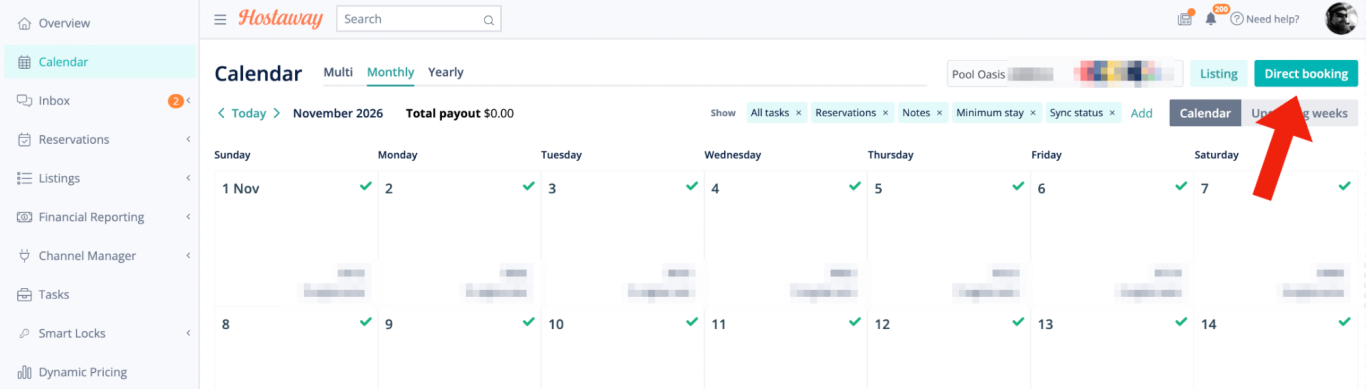
To make the new fields appear, you need Truvi to push data through for a reservation. You could wait for a real guest to make a reservation, but with your automations broken, that’s a risk. The better move is to force a manual booking in Hostaway.
Here’s how to do that:
Go to your calendar in Hostaway and select a month that has no bookings. Click Direct booking, then make a reservation.

If you only see the old fields, that’s expected. They still show Truvi’s old name, Superhog, but they no longer work. The new fields won’t appear until Truvi pushes data through for a new reservation.
Truvi just released a new risk model, and it quietly broke something important. As of April 8th, 2026, if you're using Truvi's guest verification as a trigger in your Hostaway automations, those automations are no longer working.
Automations are one of the most powerful tools in Hostaway. If you use them for guest messaging, you know how much they rely on getting the right triggers and conditions in place. The problem is that Truvi renamed its custom fields, so any automation using a Truvi pushback status as a condition is now broken.
Here's how to fix it, step by step.
First, check your Custom Fields. In Hostaway, go to the Reservations tab and look for Custom Fields at the top of the screen. Note: these are not the same as Listing Custom Fields, so don’t go looking there.
UPDATE: Truvi has a bug in their Hostaway integration.
If you are following their help article or the instructions they sent in their introductory email to set your triggers or conditions, your automations will not fire.
Truvi is pushing lowercase values in the actual integration, whereas their support documentation calls for uppercase values.
Your triggers expect "True" or "False" values, but the API integration is pushing "true" or "false". Since Hostaway's custom fields are case sensitive, this fails the automation.
!
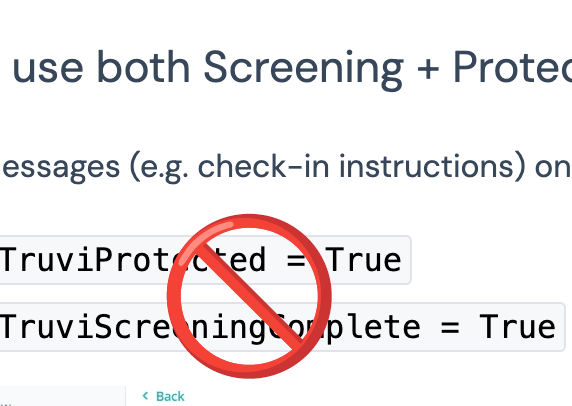
SOLUTION - rework the automations that have a Truvi condition and change the expected Values from Uppercase True or False to lowercase true or false. And then hope that Truvi doesn't fix this bug by changing the pushed values to the expected Uppercase (then the changed automations won't work).
Airbnb Rolls Out Seasonal Cancellation Policies!
Miami, FL Mar 19, 2026
What's the big deal?
I'm glad you asked. Until today, you could set only one cancellation policy for your listing. Now, with the new seasonal policies, you can set multiple ones. That means you can have stricter settings for bookings made for dates further in the future, and you can use less strict policies for last-minute bookings.
As of today, you can set more restrictive cancellation policies for big events, such as a FIFA World Cup game night or a Taylor Swift concert, and more guest-friendly ones for last-minute dates that aren't booked yet.
It's also something you can use to balance the issues in the Reserve Now, Book Later feature that Airbnb introduced in 2025. Now you can use the flexible and moderate policies, which are the only settings that give your guests the option to not pay until a few days before check-in, only for unbooked last-minute dates, while keeping the rest of your Calendar on your favorite setting.
With the introduction of its long-awaited seasonal cancellation policies, Airbnb is delivering on them today. That means you can now set different cancellation policies on different dates.
Here's how to set them up:
Open your calendar
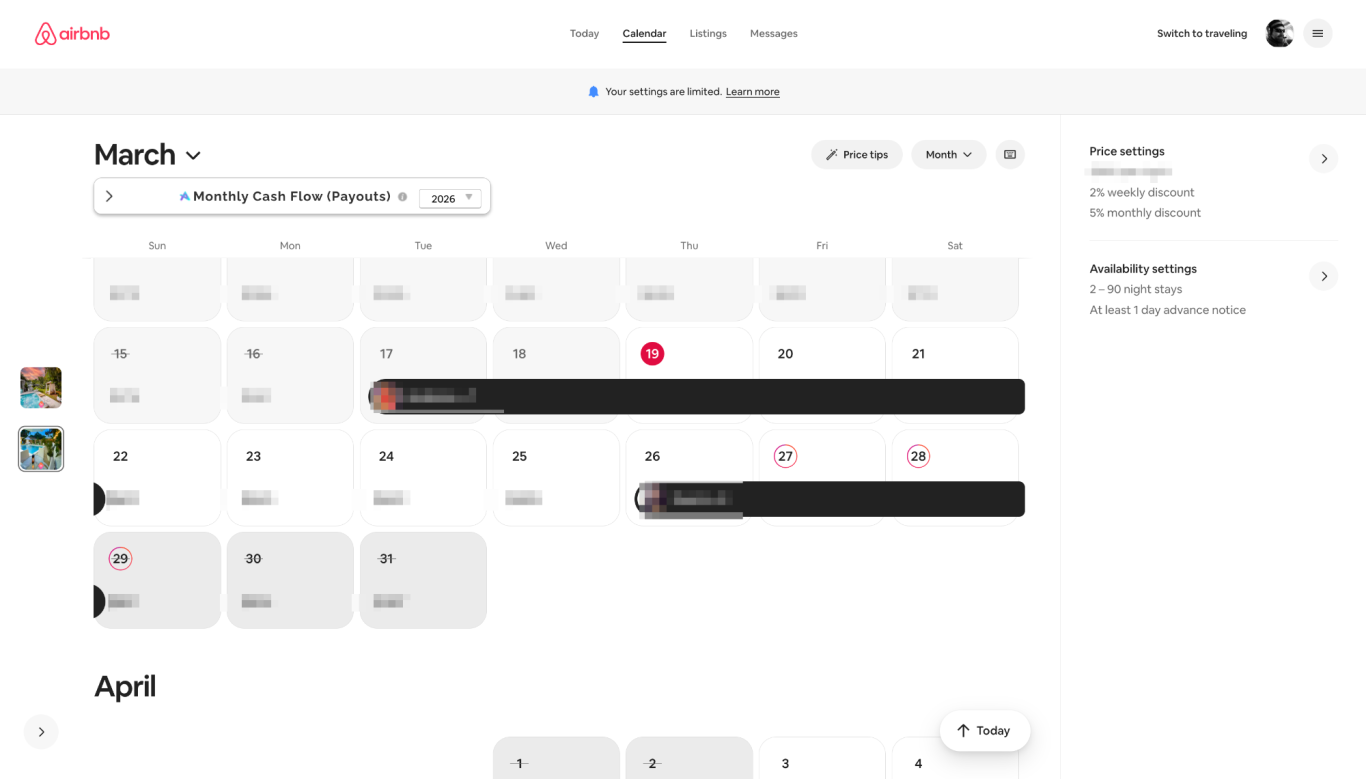
Select the dates for the new policy
You can select a single date or a date range. To select a range, click on the first date (in our case, the 22nd) and shift-click on the last date (in this case, the 25th).
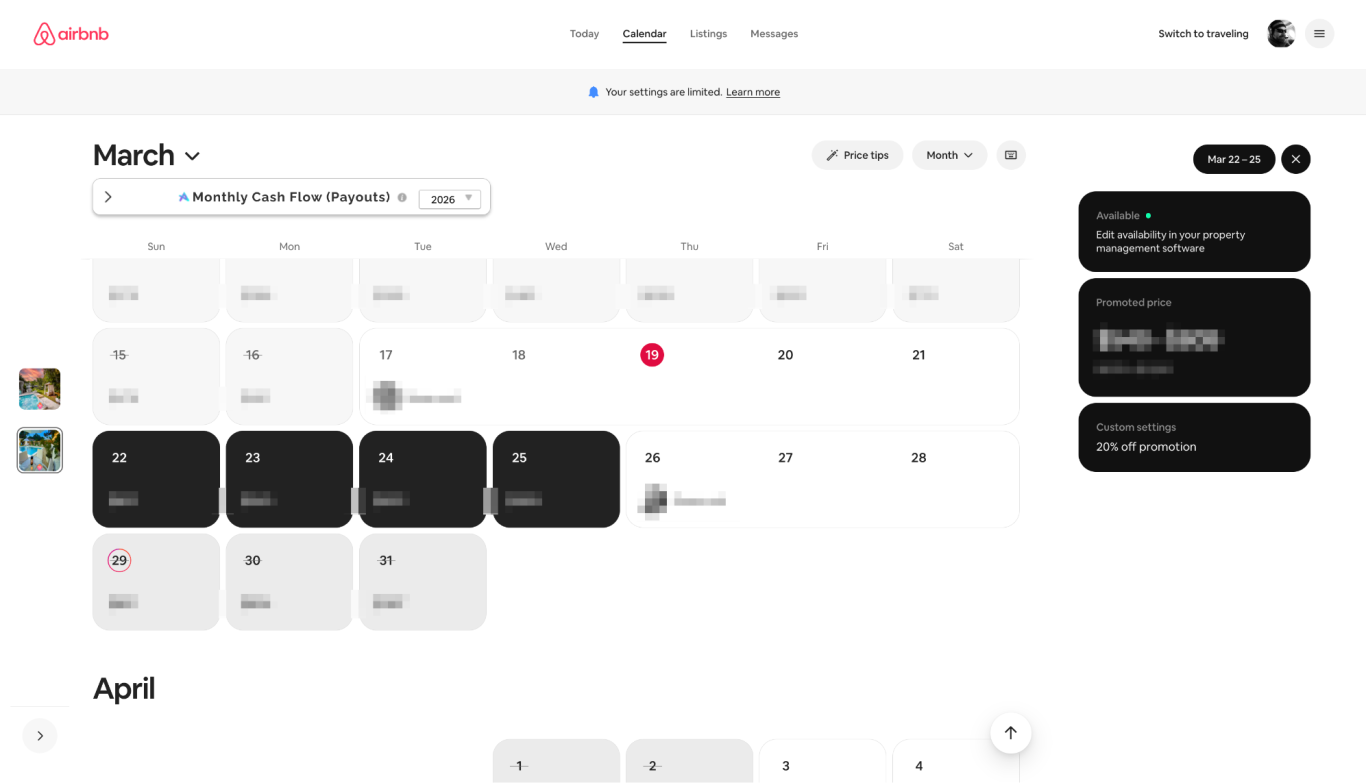
Double check your current cancellation policy
You'll see three black boxes pop up on the right - click on "Custom Settings", it's the bottom box, this is the same box that you set a custom promotion in (read "A Quick Lesson In Pricing" or "Raise your rates with a discount" to see why custom promotions are one of our favorite Airbnb tools to use to fill in last-minute gaps.
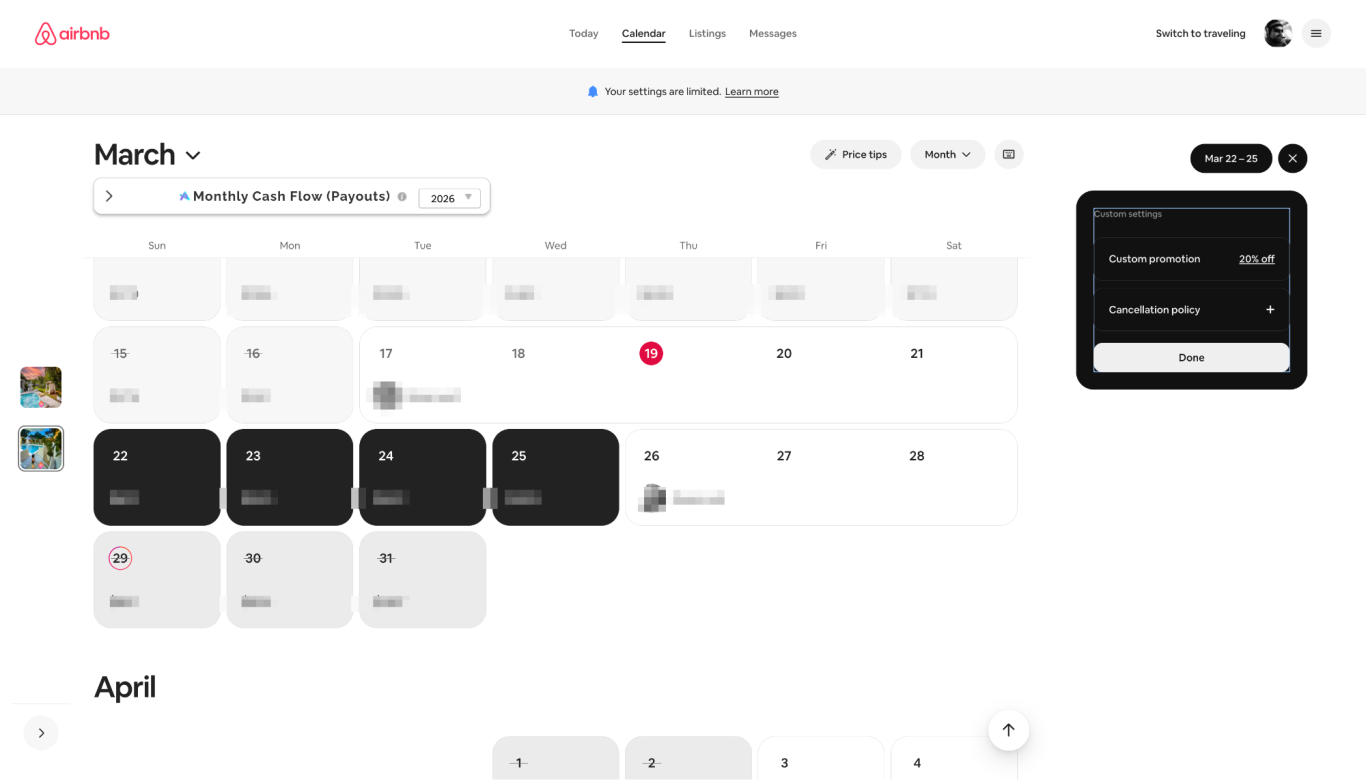
Choose your new cancellation policy
You'll see your current policy displayed, along with the options you can choose from. Although no one knows how Airbnb's algorithm works, we're pretty sure that the more lenient your policy is, the higher your listing ranks in search.
Click on the new policy you want to apply to your date range.
"But why would I want to change my cancellation policy?" you might ask. Let's say your cancellation policy is firm: guests would get a full refund at least 30 days before check-in and a partial refund 7-30 days before check-in.
If you have dates that are not booked, and are 10 days out, you could switch to a limited cancellation policy, get a better positioning in search, and keep the same protection. The guest would now get a partial refund 7-14 days before check-in.
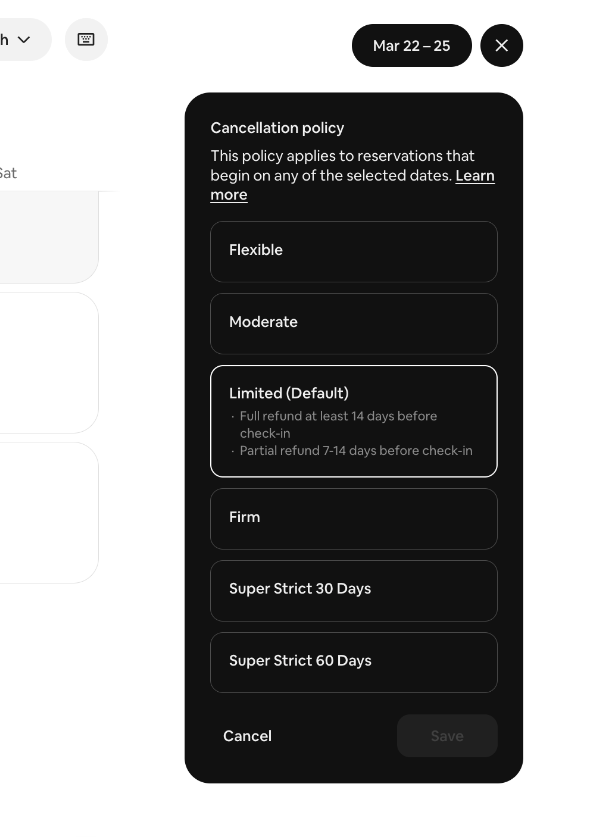
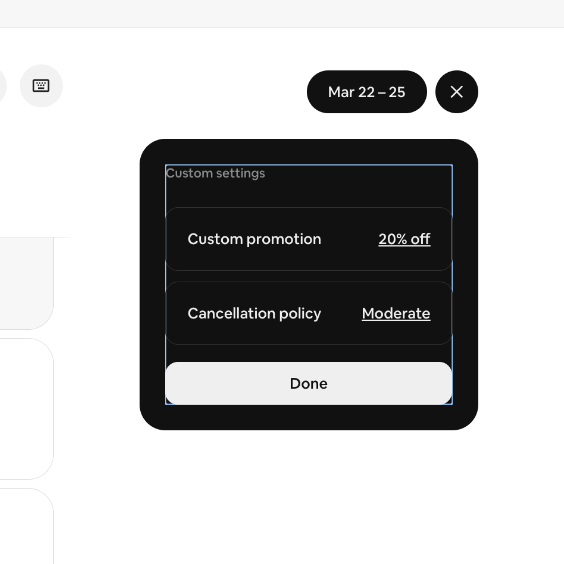
Click done, that's it.
The new cancellation policy will display in the field. In this case, we switched from limited to moderate, and we're also running a custom promotion on the same dates. If you're not running one, you'll only see the new cancellation policy.
Click done, and you're all set.
Cancellation policies are a powerful lever to pull. You must understand your booking window, or booking lead time, as Airbnb calls it. If you have professional hosting tools enabled, you can view that lead time in your Airbnb account, right now.
- Are seasonal cancellation policies rolled out worldwide?
Seasonal Cancellation Policies were announced in Q4 of 2025 as part of Airbnb's Fall Release and are being rolled out country by country. This feature was just released in the US yesterday.
- Will my dynamic software tool override the seasonal cancellation policy?
Seasonal cancellation policies are "sticky": once your dynamic pricing tool sets the new price for a day, the cancellation policy does not change.
- Can I use seasonal cancellation policies if I use a Property Management System (PMS)?
Yes! This was one of my biggest concerns. As you set the seasonal cancellation policies directly in Airbnb, they behave much like custom promotions, and are not overwritten by an update from your PMS. [I believe that both dynamic pricing software and PMS providers will allow us to automate this feature in the future, but as of today, it is a manual process.]
- Am I able to set seasonal cancellation policies in the mobile app?
As of today, (March 20, 2026), this feature only works on the desktop and not the mobile Airbnb app.
FAQ
They Stole Our Toilet Paper!
Miami, FL Oct 13, 2026
I know this is a hotly contested issue among hosts: "How much toilet paper do you leave for a guest?"
Some say they leave a "starter pack" of a few rolls, especially for guests who stay longer; others want to avoid the dreaded phone call from a guest asking someone to bring more rolls of TP.
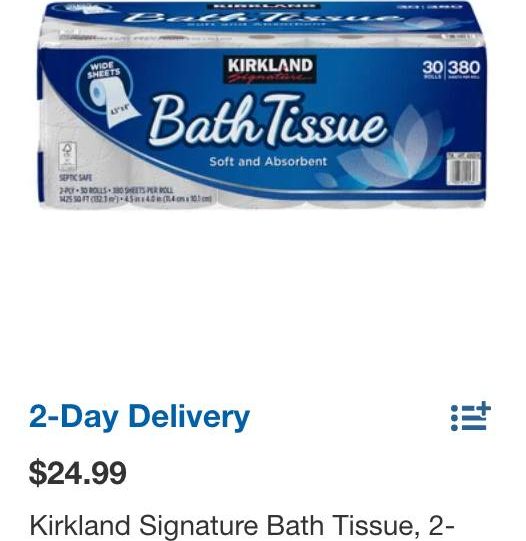
In our case, we leave a new roll in the toilet paper holder and three extra rolls in each bathroom. Additionally, there is an unopened 6-pack in the cleaning closet. In our 3-bathroom listing, that's a whopping 18 rolls of toilet paper.
We were robbed!
The other day, it finally happened: when our cleaners arrived at the listing, they discovered that our guests, who had a 3-night stay, had taken all the extra toilet paper from two bathrooms when they checked out. (They must really love two-ply.)
Seriously? What are you going to do with six rolls of that stuff? Now we'll have to replace all those rolls, and this loss makes up 0.29% of the total payout for this reservation. How will we ever recover from this terrible loss?
Stop nickel-and-diming your guests.
But you know what? We don't care. In over 200 stays, this is one of the very few times this has happened (honestly, I can't remember another instance in the past six years of hosting), and this audacity has cost us an unbelievable amount of - wait for it - $4.30. So we're not going to start a GoFundMe campaign or file an air cover claim to recoup this expense - after all, we spend more money on complimentary snacks and drinks for our guests, for crying out loud!
So stop focusing on the little things and refocus on providing exceptional hospitality to your guests. Don't be penny-wise and pound-foolish. Spoil your guests, and you'll reach the point where 91.4% of them rave about your hospitality in their reviews, just like our guests do.
And that more than makes up for the $4.30 loss.
I promise.
Why Paying Full Price for Airbnb Amenities is a Rookie Mistake
Miami, FL Aug 25, 2026
Furnishing an Airbnb can be quite expensive, which can weigh heavily on your budget—especially when you lower your prices during the off-season to attract bookings.
Amenities play a crucial role in enhancing the guest experience at your listing, so it's essential not to skimp on key appliances, as they don't last forever.
For example, a few weeks ago, our oven and dishwasher were damaged due to a failure by our local power company, FPL. After some back-and-forth, the utility company paid us a claim for these two appliances, which amounted to about 80% of their value—not bad, but we still needed to replace them.
Over the past five years, the prices of these appliances have risen significantly, so we found ourselves paying about 30% more than what we originally paid. Consequently, the claim only covered around 50% of today's costs.
When we went shopping for replacements, we originally faced a price tag of $4,200 for brand-new appliances. However, by visiting an outlet store, we managed to pay just 40% of the original price—slightly less than what the utility paid out on the claim.
In the end, we replaced our old appliances with brand new, top-of-the-line models thanks to some careful shopping and negotiating. We asked the store manager if we could get a better deal on both appliances, and to our surprise, he halved the price of the oven. I thought he was making a mistake.
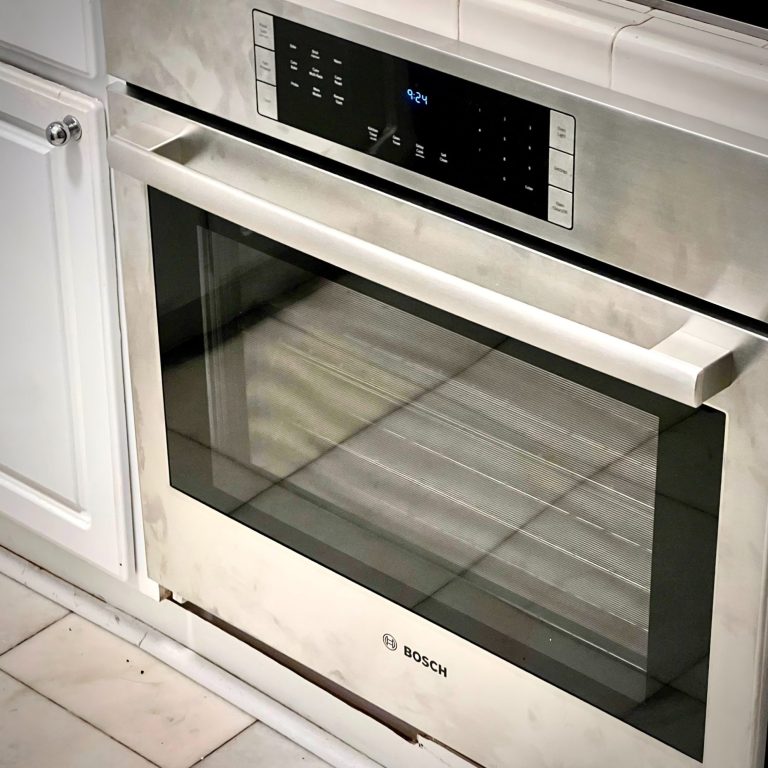
The takeaway from this experience is that you don’t have to pay full price to obtain excellent amenities. Saving a dollar is the same as earning a dollar—in our case, saving $2,500 is equivalent to earning $2,500.