#TechTipTuesday
Optimize your listing for more bookings.
PriceLabs Listing Optimizer
Miami, FL Dec 30, 2025
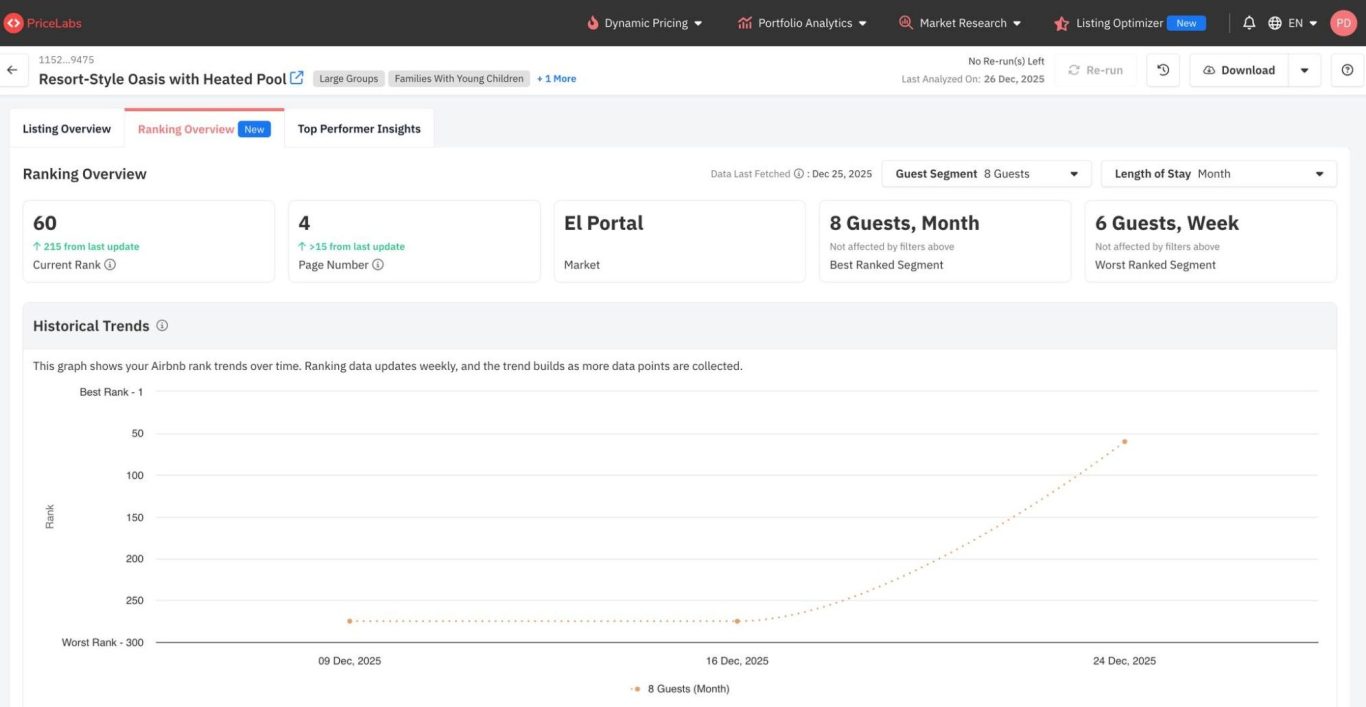
Your listing can rock a spectacular nightly rate, have amazing photos, boast great amenities and a well-thought-out description, but small details can be the reason your listing is ranking #270 in search - and trust me - no guest is scrolling 15+ pages in Airbnb to find you.
Enter a new data-driven Optimization Tool.
Pricelabs introduces a new service called Listing Optimizer. And if you’ve ever wondered where your property ranks on Airbnb, you can now definitely know. Pricelabs (str.li/pricelabs) has a large data pool of listings they run dynamic pricing for and have figured out what works in the real world.
They now offer optimization suggestions by comparing your listing’s content with that of similar top-earning local listings on Airbnb.
We analyze thousands of top-earning Airbnb listings worldwide. Listing Optimizer compares your content to proven patterns in titles, photos, descriptions, and amenities — then recommends what to fix.
Real World Results
We’ve been actively optimizing our listings for over a year now, and with Pricelabs Listing Optimizer, one of our listings went from buried on page 15 to page 4 on Airbnb in one week. Yes, it’s a paid service, but it looks like what they are promising actually works. Our second listing jumped from page 15+ to page 2.
That’s after implementing some of the suggestions that Pricelabs made, while others - like updating photos- will need to wait until the listings are not booked.
So far, Pricelabs is only looking at Airbnb data for your listing and your market, but I think I heard them say that they will expand the data to VRBO as well - although with Airbnb still being the biggest player in the South Florida Short-Term Vacation Rental market, what’s good for the goose is good for the gander.
If you’re not using Pricelabs for your pricing, you should be. You now have another reason to sign up for the platform if you like making data-driven decisions.
#TechTipTuesday
What tool do you use to optimize your listings?
#MarketingMonday
NO MORE MARKETING!
The Journey is about to begin …
Miami, FL May 26, 2025
In addition to the list of items we address with all our guests, we answer messages with questions about the property, our process, and what to do in Miami or at the listing. We also address messages about changing reservation details, adding services or experiences to their stay, and other inquiries.
We carefully craft all messages, especially the automated ones, to speak in our brand voice while still sounding like us, with heavy personalization.
So instead of sending a message that says:
"Dear Guest, we confirm your reservation. It's your responsibility to guarantee that your group will be the same as your Airbnb booking."
"Dear John, We're absolutely thrilled to welcome you on May 22, 2025, at 4:00 pm for your stay at Miami Pool Oasis! The property is at 123 Main Street in Miami, FL. We would like to verify a few details to ensure that our team has prepared the place correctly. You have reserved the Miami Pool Oasis for a total of 3 guests, are not traveling with a pet, and are checking out on May 28, 2025, at 11:00 am. If any of this information has changed, please update it on the guest portal."
Mind you, this is an automated message that is sent to the guest once the reservation is paid AND the guest has completed their guest verification.
What are some of the steps in your guest's journey between reservation and arrival that are not in our list?
In last week's #MarketingMonday post, our guest reserved our place.
Quick Recap:
- The guest found our listing in Search (First Page Search)
- They clicked on our listing (Search to Listing)
- Our place was booked (Listing to Booking)
So we're done, right? No more marketing, correct? I mean, the guest booked, and we're good, yes?
Not so fast.
Reserving your home is just the first step in the guest booking journey, which doesn't end until they return home and leave you a five-star review.
Marketing is getting a message across to your customer.
To do this effectively, you must understand your brand. That's true for everything we've discussed in the past and will discuss in future posts.
Reservation to Arrival
However, in our guests' journey, we find ourselves between the reservation and the arrival, and you know what can happen at any time? Guests can still cancel because of something you said or did. We've had guests cancel because our house rules were too long, we've had guests cancel when they realize that they can't throw a party in our homes, we've had guests cancel, and sometimes we don't know the reason, but we work hard to make sure that we don't give our guests any reason to back out of our reservation.
How many steps are in your guest's journey?
Take a minute to walk through the steps a guest takes from making a reservation to punching in the code to open the door to your listing. In our case, there are more steps than you think…
- Address*
- Arrival Info*
- Arrival messages
- Check-in details*
- Check-in instructions*
- Check-in time*
- Check-out time*
- Concierge Services*
- Confirmation message*
- Door Code and unlock instructions*
- Driving directions*
- Experience suggestions*
- Guest Portal*
- Guest segmentation*
- Guest Verification*
- ID verification*
- Link to Google map from airports to listing*
- Number of guests*
- Online Check-in*
- Payment processing*
- Payment verification
- Payment*
- Pet or no pet*
- Property Details*
- Short-Term Rental Agreement*
- Tips for travel*
- Travel Insurance*
- Welcome message*
[Steps or messages that have a star * are automated in our messaging, and not all steps happen with all booking channels.]
SIDEBAR: Airbnb recognizes the importance of messaging to our guests. In fact, it's so vital to a good guest experience that they track how often and how quickly we respond to our guests. It's the only one of the four Superhost criteria that you fully control - since even cancellations sometimes have to be made due to extenuating circumstances.
#MarketingMonday
New Booking confirmed!
Listing-to-Booking
Miami, FL May 26, 2025
Who doesn't like to read those words? Welcome to another #MarketingMonday post.
Confirmation is the final step in your guest's booking journey. Remember when it began with your listing popping up in the search results, and then continued when the guests clicked your cover photo?
Before you pop the champagne 🥂🍾 and have Airbnb to celebrate with you that a guest is going to be staying at your home, there is one final hurdle for you to clear:
The guest has to click that big red "reserve" button
Think of the booking journey as a funnel; let's review:
The Guest Journey
It begins when someone plans a trip to Miami and decides to stay in a short-term vacation rental rather than a hotel. The chance that your place is the one a guest ultimately books is 1:23,893—be fair, it's closer to 1:15,065 if they are only looking at Airbnb.
However, since no guest will scroll through the 837 pages of search results, we looked at how to stand out on the first page by using the most appealing cover photo among the 18 listings. As 80-90% of Airbnb guests only look at the first page of search results, the likelihood of booking your listing is now around 1:28.8.
Once that click on your cover page happens, you only have the first five images to tell your listing's story—but you know this since we've gone through all these steps over the past three weeks.
Now, on to the last step in your guest's booking journey:
Search to Booking
Everything that happens from now on until a guest clicks that big red Reserve button is the most fragile part of the guest journey. They've decided to like your place enough to warrant a second look. Don't worry - all you can do from now until they book is screw that up, so no pressure.
Here's where the rest of your listing comes in—your photos and their captions, description, amenities, reviews, neighborhood, hosting status, house rules, and policies. I think that's most of it.
Photos
The images should guide guests through your property, helping them imagine themselves staying there. It's a delicate balance between showing 11 photos of the same couch from every possible angle and a single picture that shows the whole room.
Photos need to be professional-level, with great lighting and styling.
Description
The first sentence must make an emotional connection with your guest. Which introductory sentence do you like better:
- Welcome to the Miami Pool Oasis, a charming four-bedroom house with a big pool and many games.
- Welcome to The Oasis, a serene Miami retreat where exploration meets tranquility to restore your spirit.
Yeah, we like the second one better, too.
Remember, people are in a hurry and will not read a novel set in your listing. The shorter we keep our descriptions, the better they perform with our guests.
Strike a balance between mentioning all essential features, making it easy to scan, and avoiding boredom for the guest.
Groupings of features and bullet points work great.
STYLISH & PET-FRIENDLY
• Plush pet bed, water bowls, and welcome treats
• Shaded outdoor space and nearby walking routes
• No sacrifice in design or cleanliness
BTW, you can take a look at how we write out descriptions here: www.airbnb.com/h/miamipooloasis
Amenities
List all the amenities you have. Add amenities your guests are looking for. Listen to your guests. In the beginning, we often heard, "We loved staying here, but it would be great if this place had a _________________." And then, we made sure it would be there for the next guest. Don't be afraid to ask your guests. We do.
Knowing who your guest persona is or having an avatar is helpful here.
Pet-friendly listings have about 5-10% higher occupancy and can command higher nightly rates. If your building doesn't allow pets, you don't need to add pet-focused amenities. If you do, you should charge a pet fee and have written pet policies. You can make pet parents ecstatic by providing snacks and a water bowl.
Reviews
What others say about your listing may be the most important factor guests consider when booking your home. It's called social proof, and all you can do is be an unbelievable host with an incredible listing. Don't be afraid to ask guests for reviews; usually, they are happy to leave over-the-moon reviews when they've had a great experience. We have an automatic message sent to all our guests a few days after their stay, asking for a review, unless they wrote one, in which case the message is not sent.
Here's our favorite recent review (well, the private message to us): "You guys are freaking awesome!!!"
Neighborhood
Your home can be the perfect fit, and the price may be out of this world, but if it's too far from where the guests need to be, they will look elsewhere.
Ensure you set the guests' expectations so they aren't disappointed when they arrive. It's better to mention the construction site next door now than get bad ratings and reviews because you didn't.
Hosting Status
Guest favorite, Superhost status, your response rate, etc, will build trust with potential guests. If they see that it takes you a week to respond or you only respond 70% of the time, that's not good.
Work on becoming a Superhost, being a Guest Favorite, and having a quick response rate (the last one is the easiest). These metrics play a big part in the search algorithm, so you should know the steps Airbnb requires.
You can keep track of where you are on your Superhost journey here: https://www.airbnb.com/performance/superhost
House Rules
Nobody reads the house rules. However, your house rules must be there if you want Airbnb to help enforce your expectations. Don't make them so short that you leave out some critical points, but not so long that no one can read them, even if they want to.
The language should sound polite and friendly, not like a lawyer drew them up and you're just waiting to pounce on a guest for any violation. We lost bookings when our house rules were too long. We had them shortened 15 minutes after we got that comment.
Policies
Cancellation policies and safety equipment must be completed correctly. Your cancellation policy should be as lenient as you can stomach. (We always look at our direct competition and make our policy match or less strict.)
Click the button!
Once you have all these steps dialed in, you should have no problem getting your guests to click that nice, big, red "reserve" button.
And you're done!
Well, not so fast. You've finished the guest booking journey, but now the real guest journey begins. We'll dive into it over the next few weeks on #MarketingMonday.
#MarketingMonday
Are you forcing potential guests to click on your listing?
Search to Listing conversion.
Miami, FL May 5, 2025
Our fictitious guest is intrigued by the cover photo and title and is now clicking on your listing!
Click-through rate
In internet marketing parlance, this moment in time is called a click-through and is measured by dividing the times a search result (in this case, your listing) is displayed by the times it is clicked on.
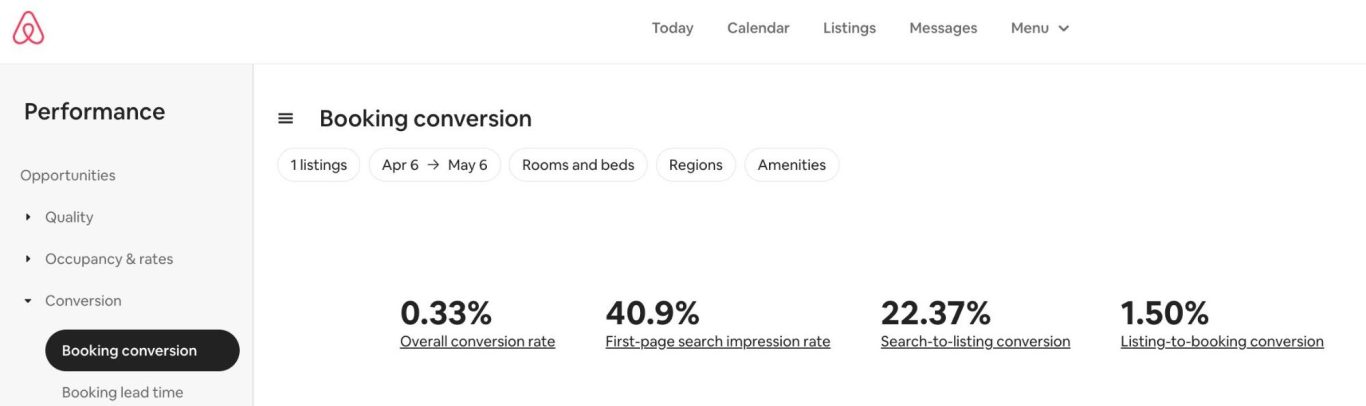
You can find your click-through rate, or Search-to-Listing percentage, in your Airbnb Insights.
Go to Menu -> Insights -> Conversion -> Booking conversion.
Definition: This number is how often your listing was displayed on the first page of the search results, divided by how many people clicked on the cover image to get to your listing.
Mind you, the potential guest has not booked anything yet; they were just interested enough to warrant a closer look. Let's understand what they see:
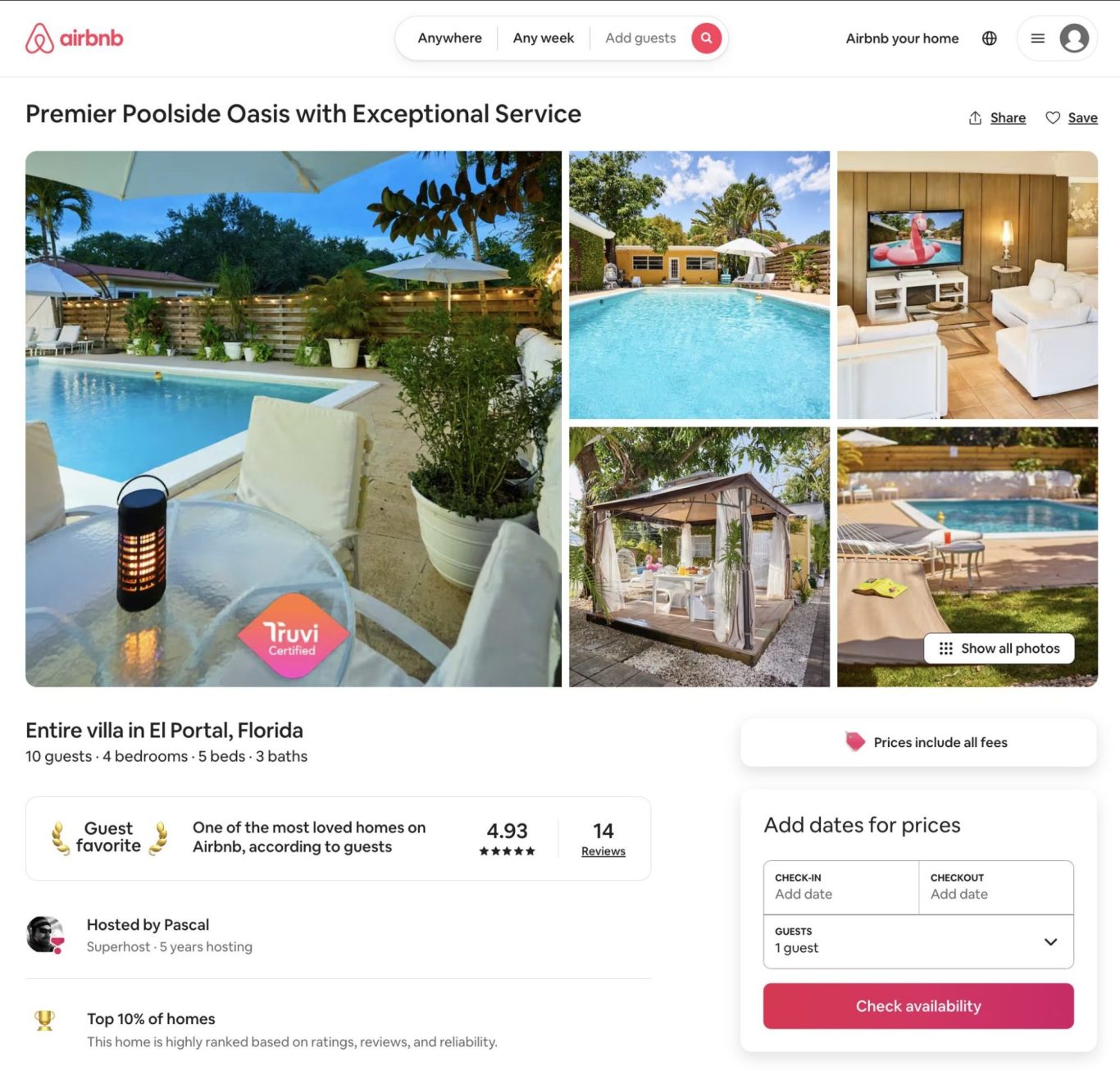
We already optimized your listing title (see last week's post) and cover image (discussed two weeks ago), which appear at the top of your listing page.
Here's what else is on the page:
- Four more images
- Type of place with the maximum number of guests, bedrooms, beds, and bathrooms
- Hosting and property status (superhost, guest favorite, …)
- Pricing
- Dates
- Number of Guests
- Reserve button
Let's look at the four additional photos. Go ahead and pull up your listing; it's okay; I'll wait. Remember when we talked about repetition when optimizing your title? How much repetition is in your photos?
Are you repeating your mistakes?
"You're funny," you might say. "There's no repetition since there are no words displayed. It's just images." Well, I'm sorry to disagree with you. You're wrong. I've seen plenty of listings where the Cover photo is the interior living space, and the following four images are of the same room.
These photos must entice your guests to browse your listing.
These 4 photos must show the 2nd-5th best features of your property (the best feature should be in your cover photo). And no, at this point, the guest is not scrolling through all your images - they've just landed on your listing, and before they do anything, they're gone if the visitor sees something they don't like. And you won't capture the final and most crucial step: the listing-to-booking conversion.
We'll talk about that next week. For now, study your photos—are the first five images telling a story about your listing? Or are they merely repeating the same couch in your living room?
#MarketingMonday
Are you repeating yourself?
Miami, FL May 5, 2025
Are you repeating yourself?
Are you repeating yourself?
Are you repeating yourself?
It's annoying, isn't it, especially if your repetition is costing you time and space.
On last week's #MarketingMonday, we looked at the cover photo on your listing and the immense importance it plays in getting people to consider your listing when they are searching for a place to stay on Airbnb.
It's the most important part of your listing for search with Airbnb, giving it over 3/4 of the real estate of your search result, but did you know how many more data points are squeezed into the result? (No peeking - guess.)
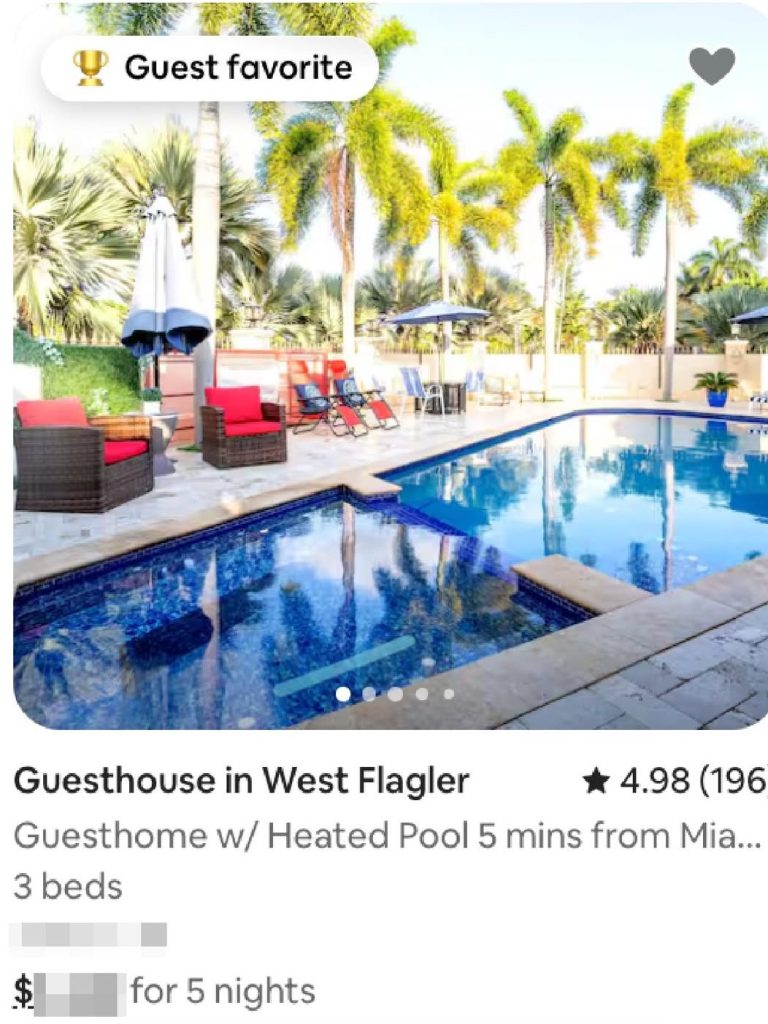
If you said 10, you are correct - here they are in order of the space (or importance) Airbnb gives each one:
- Cover Photo (76.5%)
- Listing title (38.2%)
- Guest Favorite / Superhost (28.6%)
- Type of Place (26.2%)
- Price (19.6% )
- Dates (14.3% )
- Rating (10.3%)
- Beds (10.3%)
- Reviews (8.1% )
- Favorite (7.2%)
With the listing title being the second most important item, do you really want to repeat yourself here? That would be annoying and a waste of valuable space.
So let's look at one of the listings on the first page of Airbnb when I search for a place in Miami. If this is your listing, congrats on being placed so highly - obviously you're doing something right.
A bad title for this place would be:
3-bed guest favorite Guesthouse in Miami
Why? Because all this info is available elsewhere in the search results.
The title they picked is much better, since it calls out the property's best amenity (the heated pool) and adds the distance from where the guest is looking at the end.
Next week, we'll talk about "Search to Listings conversion," but for now, work on your listing title.
Have you crafted your listing title so it doesn't repeat itself and adds to the other info in your search results?
Nobody's booking your listing (if they can't see it)
#MarketingMonday
Miami, FL May 5, 2025
I know this sounds simple, but if a guest can see your listing, they won't book it. And the only thing guests have to go on is your cover photo.
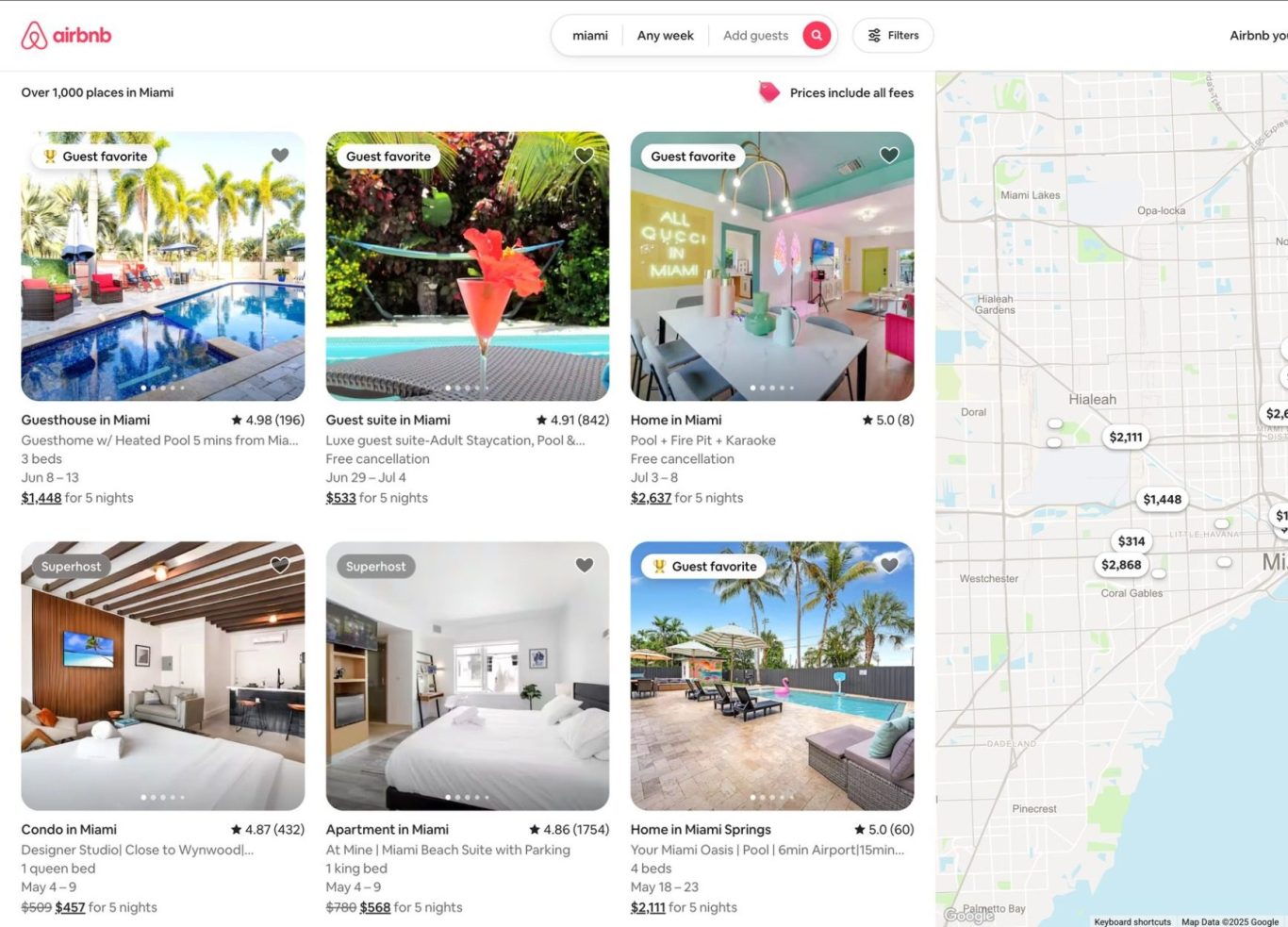
Have you ever thought about the first photo on your listing? You should. Must it be the absolute best photo you have that explains your property?
First page of Search
Your listing's placement is determined by a bunch of factors in the Airbnb algorithm, including your listing's availability, nightly rate, superhost status, guest favorites, guest search history, etc.
So, how often is your property featured on the first page of Airbnb? Well, Airbnb calls this metric "first page search impressions," and you can find this number under
Menu -> Performance -> Booking Conversions
Once Airbnb shows your listing in search results, your cover photo is the only thing that keeps your guests from scrolling right past it.
What makes a great cover photo? It needs to entice a potential guest to book your place. It needs to show off the best feature in the best light.
How do I make an image my cover photo?
Selecting your cover photo is very easy. Go to your Listing editor, click "All Photos," then "Manage photos." Then simply drag the photo you want to be your Cover photo to the very top-left of all photos.
Track your new cover photo's performance.
Leave that photo in place for two weeks and see if your first page search page impressions change. Make a note of where you start and take note again after two weeks. If your results haven't changed, select a different and better photo. And repeat the process.
Feel free to share the percentage of your listings' first page search impressions here, and update that number in a few weeks.
#MarketingMonday
Next week, we'll talk about "Your Listing Title," but for now, work on getting your cover photo selected and set up.
What's in a name?
#MarketingMonday
Miami, FL Apr 28, 2025
Have you ever googled your listing name?
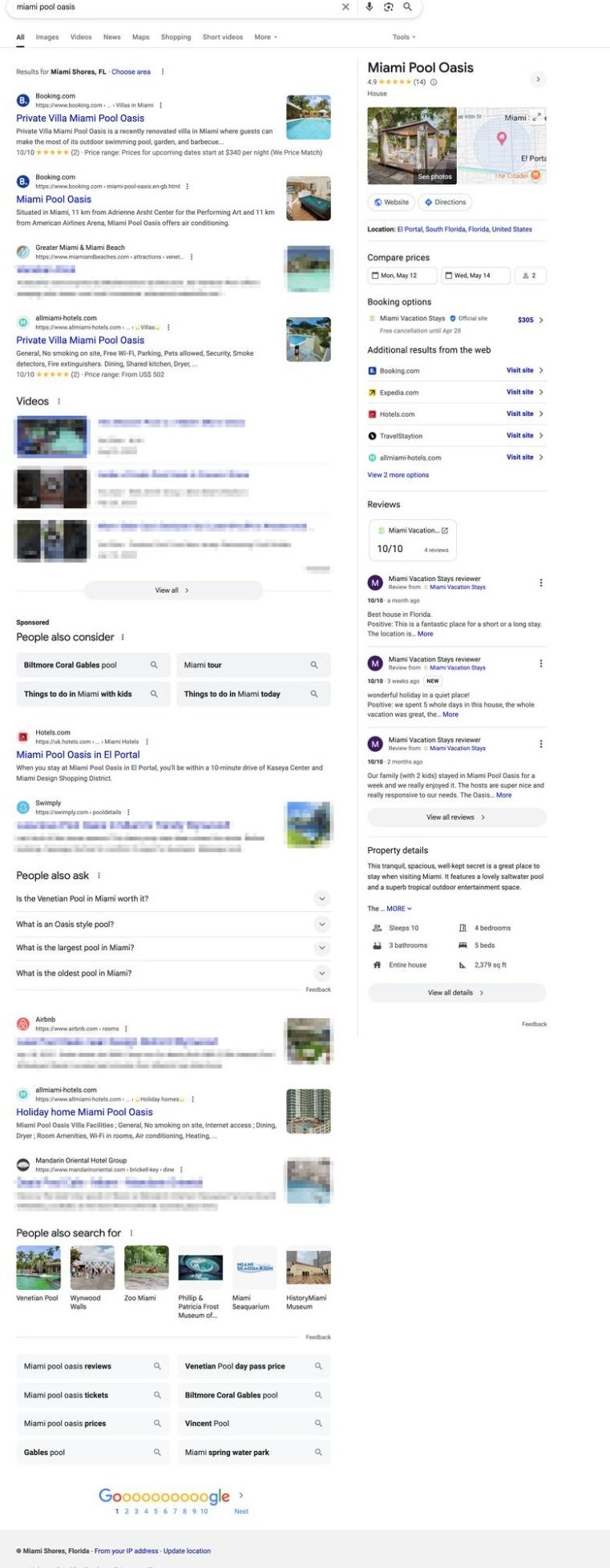
I bet that your guests have. And if your listing name is "4 bedroom Miami house w/ pool," your listing is probably not gonna show up on the first page at all - ours didn't, but a lot of homes for sale and other non-related links populated the top 10 search results.
Name your listing something unique.
A descriptive name is valuable in search - take ours for example:
Miami Pool Oasis
Looking at the first page in Google Search:
- 60% results are our listing on different channels,
- 20% of results are for other listings,
- and the remaining links go to non-short-term vacation rental listings.
In other words, three-quarters of the listings on Google's front page end up with our property.
One of the ways that we make that name stick on Google, is to use the listing name as our "custom link" on Airbnb listing (it's all the way at the bottom of your listing editor.
Can you guess what our custom name is? If you said www.airbnb.com/h/miamipooloasis, you'd be correct.
Now take a look at Google's first page results. Notice anything to the right of the links?
Do you see the same panel when you search for your listing name?
One day is killing your business!
Miami, FL Feb 28, 2025
Would you be surprised if I told you that one day is blocking over 26% of your booking calendar?
Remember COVID? Airbnb (and all other channels) required hosts to block a full day before and after each booking.
We came to love those extra days of preparation–it gave us a chance to make sure our listings were spotless; the extra day slowed down the hectic pace of back-to-back bookings and made sense during the pandemic; after all, we wanted to make sure that our listings where clean and healthy (we even ran an Ozone machine in that extra unbooked night).
Preparation days kind of snuck in.
After the lockdown ended, that preparation day sorta stuck around, but we failed to realize that one day was killing our business.
Let's say you have a guest arriving on Friday and staying for the weekend. Adding just one day of preparation results in your Thursday (the day before check-in) and Monday (the day after check-out) being blocked in your Calendar for 5 days for a 3-day reservation.
Wait, it gets worse
To add insult to injury, Airbnb adds these blocked days to your Occupancy rate, so in our example of the three-night booking, Airbnb will show you a nice, healthy occupancy rate of 5 nights (40% higher than your actual booked rate)!
Now, before you go and call Airbnb to complain, they do have a good reason for counting the blocked days: if some of your bookings come from other channels, Airbnb will show them as blocked nights, so the occupancy rate is correct again, unless you're blocking nights before and after that booking on the other channel, too.
Your listing is dropping like a rock in Airbnb's Search Results!
Let's look at this differently: Say you have just one booking per month (I hope you have many more bookings than just one, but let's assume one for this example). Adding a day before and after that booking blocks 2 days.
"But it's just 2 days," you say, "so why worry about that since the prep day makes my life easier?"
Well, do the math: 2 blocked days * 12 months equals 24 blocked days, or 3 1/2 weeks, that a guest can not book your listing, and–more importantly–your listing does not show in the search algorithm for 24 days because Airbnb does not display an unavailable listing, and blocked is just as unavailable as booked.
- 2 bookings per month, block 1.6 months per year
- 3 bookings per month, block 2.4 months per year
- 4 bookings per month block over a quarter of your year
With 4 reservations a month, YOU'RE TELLING YOUR GUESTS THAT YOU DON'T WANT THEM FOR OVER 26% OF YOUR AVAILABILITY.
And you're still wondering why the Airbnb algorithm doesn't show your listing? Would you show a place that is only available for 3/4 of the year over one that is always available?
Remember, this calculation does not include days booked by guests, but only the days you blocked for preparation.
You're blocking even more than you know.
Oh, and one more thing - remember our 3-day weekend booking from earlier that blocked Thursdays and Mondays?
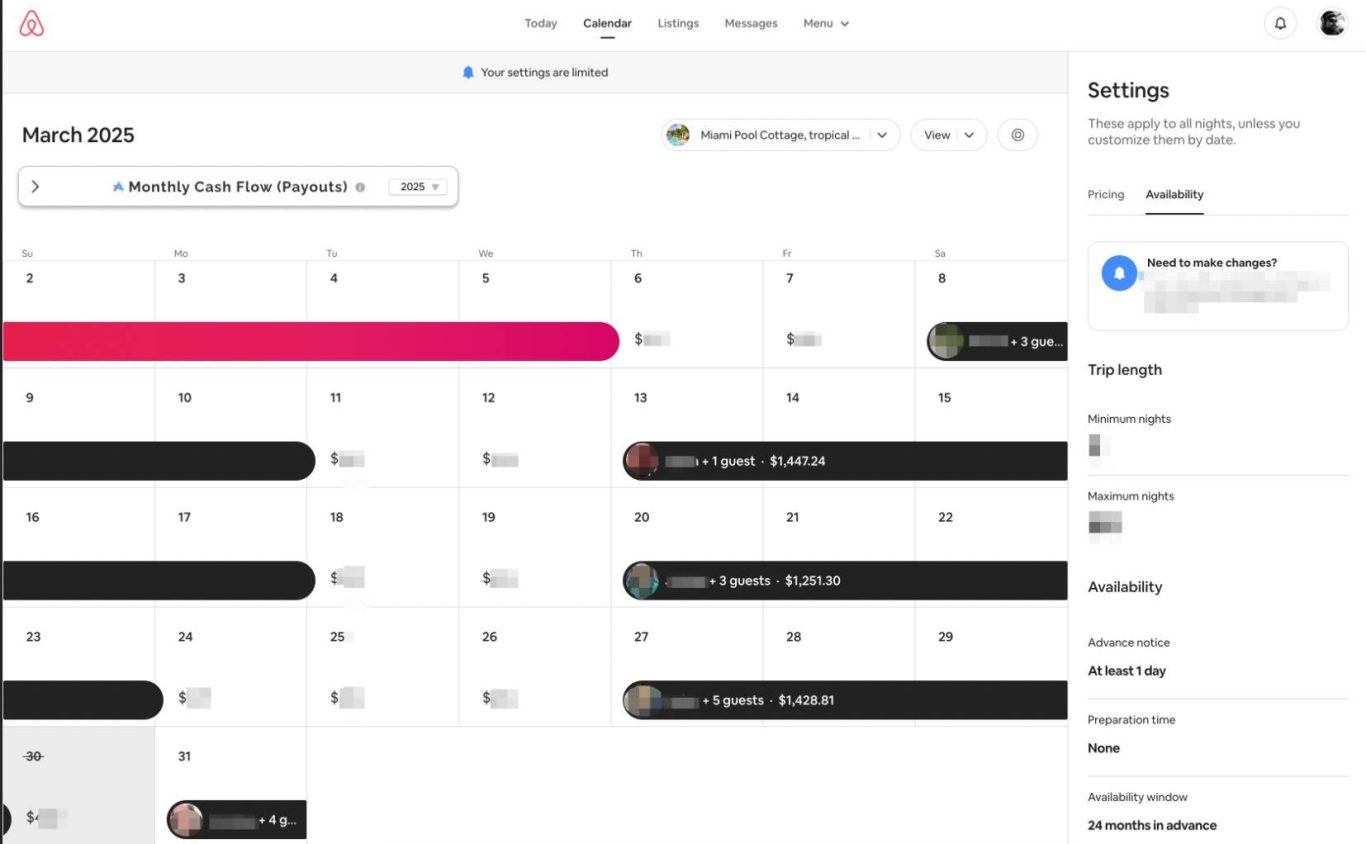
Look at the last booking in our March Calendar:
It would have been impossible for our guest to book (or even find our listing on Airbnb) because the prior guests would have checked out on the Sunday before the last March booking. That would have blocked Monday, the day our guest is checking in.
That one day would cost us a 4-day booking.
If you want to turbo-charge your listing, set your preparation time to None and return all those empty days to your Calendar.
Here's how to set it correctly:
- Click on your Calendar in Airbnb
- Click on the Availability under Settings
- Scroll down to Preparation time to put it to None.